
Why is my website slow and what can I do about it?

Robert Oosterloo
Updated on · 4 min read
A slow website costs visitors: those who wait too long click away. Google also considers speed. Your leflite website is built to be fast, but with oversized photos, videos, and extras, that can change unnoticed. Here you can read how to measure, what the most common causes are, and what you can do about it.
In short
- First measure with PageSpeed Insights, especially the score on mobile.
- Cause number one: oversized photos, especially as the background of a section.
- A background video can be turned off on mobile with Do not load video on mobile.
- Many maps, social media widgets, and extra plugins make your website heavier.
- If the speed is still not in order afterwards? We can optimize your website.
Measuring: PageSpeed Insights
Go to pagespeed.web.dev, enter the address of a page and click on Analyze. You will receive a score from 0 to 100 for mobile and for desktop, and a list of improvement points. Pay special attention to mobile: that’s where most visitors are and where slowness is noticed first.
Test a few different pages: the homepage, a page with many photos, and, if you have one, a product page. Test again after each adjustment.
Cause 1: oversized images
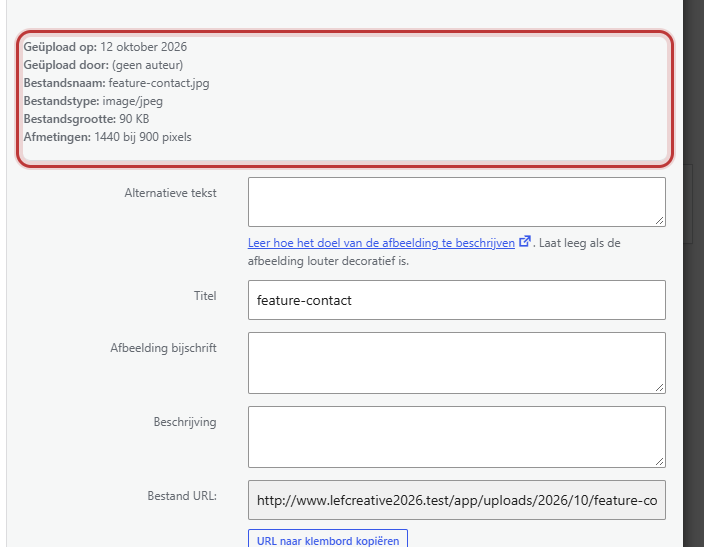
A photo from your phone is often 4000 pixels wide and 3 to 6 MB large. On a website, 1200 to 1920 pixels and a few hundred KB is sufficient. Check in Media → Library for a photo the File size and the Dimensions.
Nog geen website op leflite?
Wij bouwen hem samen met jou. Daarna pas je alles zelf aan, precies zoals in dit artikel.
- Online binnen een week
- Hosting, SSL en back-ups inbegrepen
- Vanaf €49,95 per maand

Your website is already helping: photos in the first section of a page load immediately, all others only when the visitor scrolls to them. But an oversized photo remains heavy. Pay special attention to:
- Section backgrounds: they always use the full photo, not a smaller version. Upload them at a maximum of 1920 pixels wide.
- Image size in the blocks: choose Large or Medium large if the photo does not span the full width.
How to resize and replace your photos, read in uploading images in the correct format.
Cause 2: background video on mobile
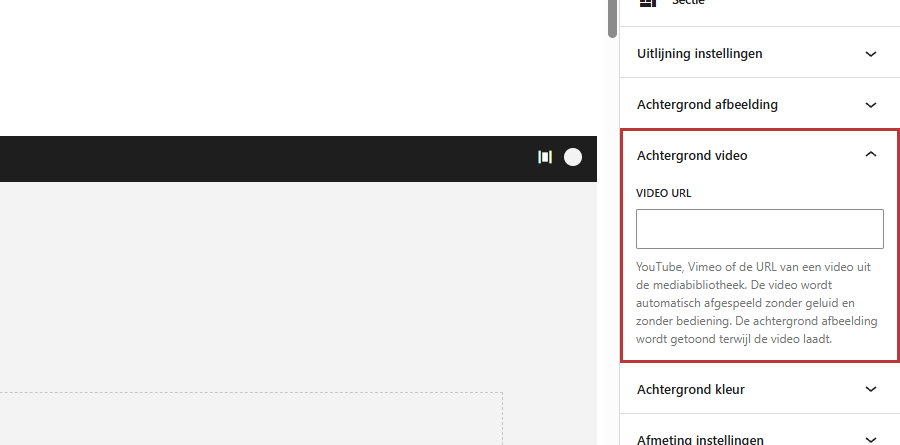
A video as the background of a section is nice, but heavy, especially on a mobile connection. Select the section and choose in the panel Background video under Load video on mobile the option Do not load video on mobile. On phones, you will then only see the background photo. Read a video as background.
Cause 3: many embeds
A Google Maps map, an Instagram feed, a Facebook widget, or a chat button each load code from another website. One is usually not a problem, five on one page is. Maps and other code in the block Code only load when they come into view, but still place them only where they really add something. See placing a Google Maps map or other code. Regular videos in the block Video are not a problem: they only load when the visitor clicks play.
Cause 4: large galleries and sliders at the top
Everything in the first section loads immediately. A slider with ten large photos at the top of the page makes it slow. Preferably place one good photo at the top, and the gallery or slider further down. Use a smaller Preview image size in galleries.
Cause 5: extra plugins
Every plugin adds code, and some load that on every page. Your website loads the code of its own blocks only on pages where that block is present, but an extra plugin often does not. Do not install plugins without consultation and remove plugins that you no longer use. See which plugins are standard in your website.
Tip: make it easy for yourself: resize each photo by default before you upload it. That solves most of the problem for most websites.
What we do
Speed also depends on things you cannot see, such as hosting and caching. If you host your website with us, we take care of that. Do you want us to audit your website and make it faster? Read what we do at optimizing your website or webshop. With WordPress maintenance, we also keep your website in shape afterwards. See also keeping your website safe and up-to-date.
Not working?
- The score varies per test. That is normal: it fluctuates a few points. Look at the trend and test a few times.
- I have resized photos, but the page is still slow. Have you also re-selected the new photo in the blocks and sections? See replacing images.
- Only one page is slow. Check what is different there: a large background, a map, a slider at the top, or a heavy embed.
- The entire website is suddenly slow. That is often not due to the content, but to the server or a plugin.
Can’t figure it out? Call us at 06 35 66 47 73, email to info@lefcreative.nl or contact us.
Frequently asked questions
Above 90 is excellent. Pay special attention to the loading time on mobile.
Share this article
Robert Oosterloo
Robert Oosterloo is eigenaar en UX/UI-designer van Lef Creative in Kollum. Hij ontwerpt websites, webshops en software voor ondernemers in Noord-Nederland.
Read also
The default plugins of your website
Confirm your login via email
Logging in to your website






Want a website like this?
Here you can read how easy it is to maintain a leflite site yourself. Want one too? We will think along with you, no strings attached.
Prefer direct contact? Call Robert at 06 35 66 47 73 or send a WhatsApp.