
How do I link my social media to my website?

Robert Oosterloo
Updated on · 3 min read
Do you want visitors to follow you on Instagram or LinkedIn? Fill in your profiles once in the Company Details. Then you can place them in your footer or on a page using a shortcode, with or without an icon.
In short
- You fill in your profiles under General options → Company Details, tab Social media.
- Always enter the full URL, starting with https://.
- Display them with
[theme_option field="sm_instagram" icon="true"]. - Links to social media open in a new tab.
Step 1: Go to Company Details → Social media
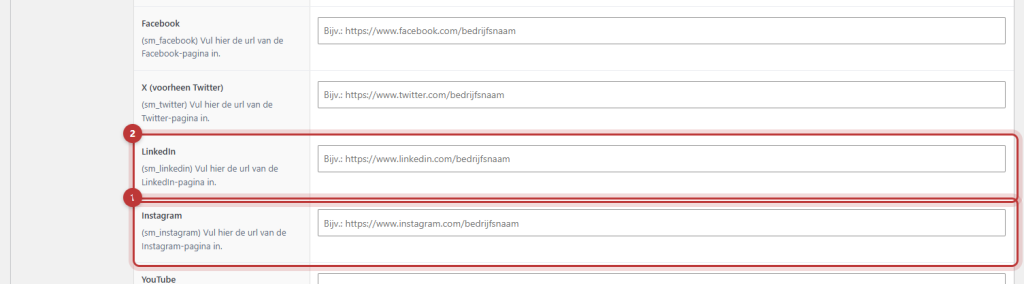
Click on General options, then at the top on Company Details and open the tab Social media. You will see fields for Facebook, X (formerly Twitter), LinkedIn, Instagram, YouTube, Vimeo, Pinterest, Skype, Reddit and Discord. At the top, there is also WhatsApp: this is about a WhatsApp button on your website.
Step 2: Enter the full URL
Open your profile in a browser and copy the address from the address bar, for example https://www.instagram.com/yourbusiness/. Paste it into the field. Just your username is not enough. Leave fields for platforms you do not use empty. Click on Update.
Nog geen website op leflite?
Wij bouwen hem samen met jou. Daarna pas je alles zelf aan, precies zoals in dit artikel.
- Online binnen een week
- Hosting, SSL en back-ups inbegrepen
- Vanaf €49,95 per maand

Step 3: Display them on your site
Your profiles do not automatically appear on your website. You place them with a shortcode in a Text block or in a widget in the footer. Use the field name that is in parentheses under each field, such as sm_facebook, sm_linkedin or sm_instagram.
With icon
[theme_option field="sm_instagram" icon="true"] shows the Instagram icon with the word ‘Instagram’ as a link. If you place several one below the other, add newline="true":
[theme_option field="sm_facebook" icon="true" newline="true"][theme_option field="sm_linkedin" icon="true" newline="true"]
Only the icon or your own text
- Only the icon: add
text="false". Handy for a row of icons. - Your own text: place the text between two shortcodes, like
[theme_option field="sm_facebook" icon="true"]Follow us on Facebook[/theme_option]. - The address itself as text: add
keeptext="true".
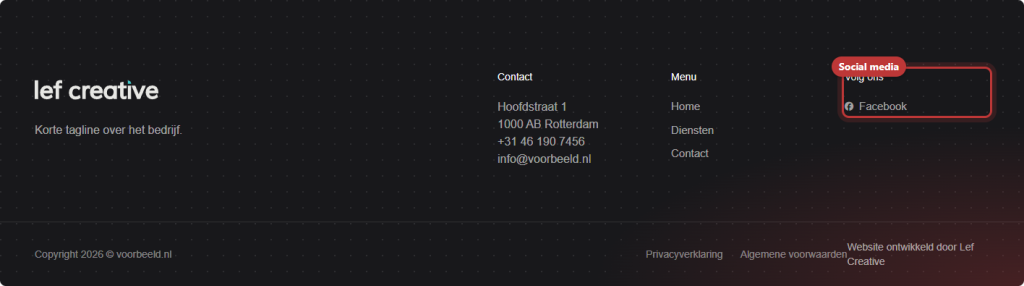
Note: use icon="true" only for the social media fields (those with sm_). For your phone or email, it gives a wrong icon and strange text. How to display that information is explained in automatically displaying your phone number in text.
Share buttons are a bit different
These shortcodes link to your profile. If you want visitors to share a page from your website on their own social media, then you use share buttons. Read how to let visitors share a page.
Your other information, such as phone and address, is on the first tab: see changing your company details.
Is it not working?
- The link goes to the wrong page. You have only filled in your username. Enter the full URL starting with https://.
- You see the shortcode as text. Check the spelling and use straight quotation marks.
- There is nothing. The field for that platform is empty, or the field name in the shortcode is incorrect.
- You are missing a platform, such as TikTok. Not every platform has a field. Place a regular link in your text, or contact us.
Share this article
Robert Oosterloo
Robert Oosterloo is eigenaar en UX/UI-designer van Lef Creative in Kollum. Hij ontwerpt websites, webshops en software voor ondernemers in Noord-Nederland.
Read also
Automatically inserting phone number in text
Giving a section a background color
A search function on your website






Want a website like this?
Here you can read how easy it is to maintain a leflite site yourself. Want one too? We will think along with you, no strings attached.
Prefer direct contact? Call Robert at 06 35 66 47 73 or send a WhatsApp.