
How do I ensure that the email from my website arrives?

Robert Oosterloo
Updated on · 4 min read
Your website also sends emails: messages from your contact form, a link for a new password, and order confirmations for a webshop. Those emails need to arrive. For that, your website uses the plugin WP Mail SMTP. Here you can read how it works and how to test if it’s working correctly.
In short
- By default, WordPress sends emails in a way that often ends up in spam.
- WP Mail SMTP sends emails through a real mail server, just like an email program does.
- We set up WP Mail SMTP for you; the settings are fixed.
- Test with WP Mail SMTP → Tools → Email Test.
- The sender is always from your own domain.
Why do website emails sometimes not arrive?
Without an additional plugin, WordPress sends emails directly from the web server. For receiving mail servers (like Gmail, Outlook, and others), this looks like spam: your domain is listed as the sender, but the email does not come from the mail server associated with your domain. Such emails end up in spam or are completely rejected.
What does WP Mail SMTP do?
WP Mail SMTP ensures that your website sends emails through a real mail server, with login credentials, just like your email program does. Receiving servers then see that the email genuinely comes from your domain. This way, it lands much more often directly in the inbox.
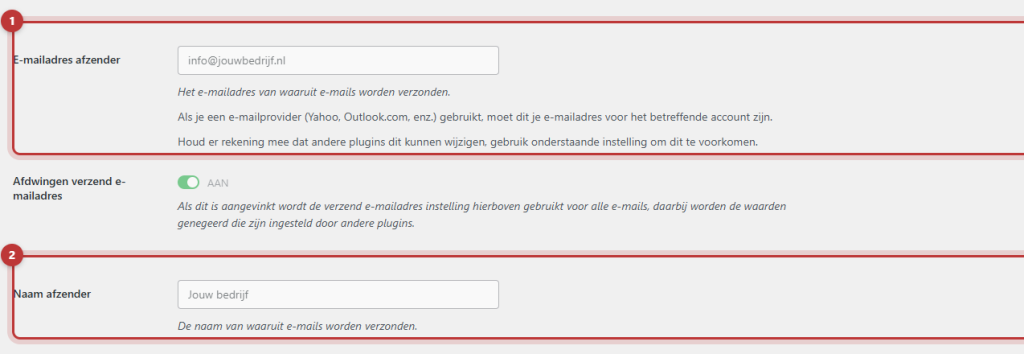
We set up WP Mail SMTP for you. The settings are fixed in your website’s configuration. Therefore, on the settings page of the plugin, you will see the message “The value of this field is set using a constant…” next to the fields. That is intentional: you don’t need to and cannot change anything there.
Nog geen website op leflite?
Wij bouwen hem samen met jou. Daarna pas je alles zelf aan, precies zoals in dit artikel.
- Online binnen een week
- Hosting, SSL en back-ups inbegrepen
- Vanaf €49,95 per maand

Send a test email
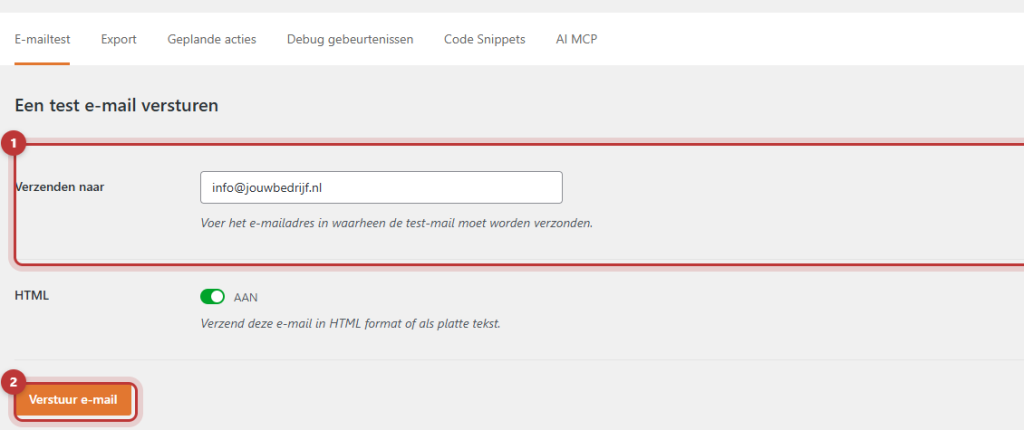
- Go to WP Mail SMTP → Tools.
- Open the tab Email Test.
- Fill in an address at Send to that you can access, for example, your own address.
- Click on Send Email.
Do you see a message that it was successful and the test email is in your inbox? Then your website can send emails. Are you getting an error message, or is the email in your spam? Take a screenshot of the message and contact us.
Good to know: if you don’t see the WP Mail SMTP menu? Then your account does not have admin rights. Please ask us to perform the test.
The sender: always your own domain
Emails from your website always come from an address on your own domain, for example, info@yourcompany.com. Also for your forms: in a form notification, never use the visitor’s address in From email address, but use Reply-To instead. See set who receives the form messages.
SPF and DKIM (we take care of that)
To prove that emails genuinely come from your domain, there are extra records in your domain’s DNS: SPF and DKIM. This tells your domain: “this mail server is allowed to send emails on my behalf”. We take care of this during setup. If you change anything in your domain’s DNS yourself, please leave these records as they are. Also see linking your domain name.
Tip: test your contact form occasionally with your own details. This way, you can identify a problem before a customer does. You can read which plugins are standard on your website in which plugins are standard on your website.
Not working?
- The test email works, but form messages do not arrive. Then it’s due to the notification or your spam filter. Check I am not receiving messages from my form.
- The test email gives an error message. Take a screenshot and send it to us. We will resolve it.
- The test email ends up in your spam. Mark it as not spam and let us know, then we will check SPF and DKIM.
- A visitor does not receive the password email. Perform the test email. If that works, ask the visitor to check their spam.
Can’t figure it out? Contact us or call 06 35 66 47 73. We are happy to help.
Share this article
Robert Oosterloo
Robert Oosterloo is eigenaar en UX/UI-designer van Lef Creative in Kollum. Hij ontwerpt websites, webshops en software voor ondernemers in Noord-Nederland.
Read also
Customize welcome email and password email
Restoring a backup
How do I set who receives the form messages?






Want a website like this?
Here you can read how easy it is to maintain a leflite site yourself. Want one too? We will think along with you, no strings attached.
Prefer direct contact? Call Robert at 06 35 66 47 73 or send a WhatsApp.