
How do I view and export submissions, and how long are they kept?

Robert Oosterloo
Updated on · 4 min read
Every time someone fills out a form, your website saves a copy: a submission. Even if the email does not arrive. Here you can read how to find and export submissions, and how long they are kept.
In short
- All submissions can be found under Forms → Submissions.
- You can export to Excel via Forms → Import/export.
- By default, submissions are automatically permanently deleted after 730 days.
- The visitor’s IP address is not stored.
- For each form, you can set a different retention period under Personal Data.
Step 1: Go to Forms → Submissions
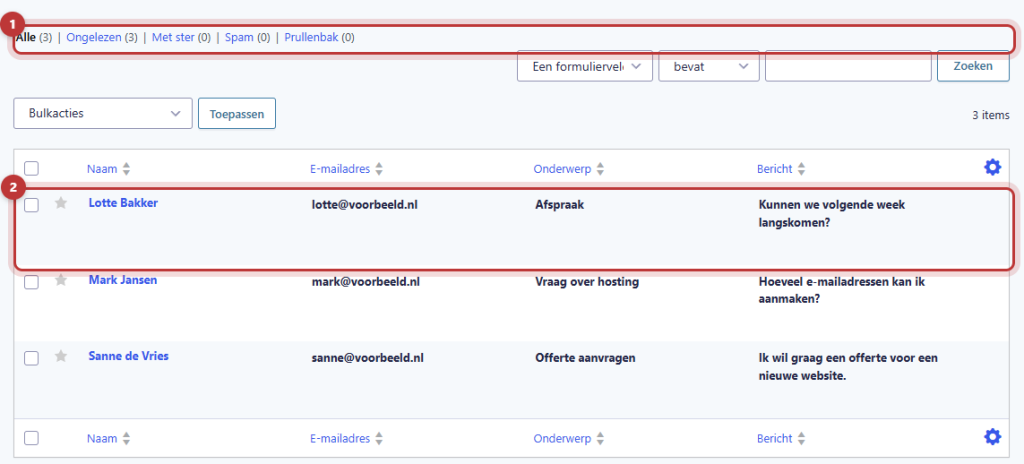
Click on Forms → Submissions in the left menu. You will see the submissions from one form. If you have multiple, select the correct form at the top.
New, unopened submissions are shown in bold. Above the list are filters: All, Unread, Starred, Spam, and Trash. Use the search field to search by name or email address.
Open a submission, mark as read or delete
Click on a submission to read everything the visitor has filled out. On the right, you can see the date among other details. With the buttons, you can:
- mark the submission as Read or Unread;
- give it a star so you can find it quickly later;
- Print;
- resend the notification Resend, for example to a colleague;
- move it to the Trash.
In the list, you can also select multiple submissions at once and process them with bulk actions.
Nog geen website op leflite?
Wij bouwen hem samen met jou. Daarna pas je alles zelf aan, precies zoals in dit artikel.
- Online binnen een week
- Hosting, SSL en back-ups inbegrepen
- Vanaf €49,95 per maand

Export to Excel (CSV)
Do you want submissions in Excel, for example a list of all registrations?
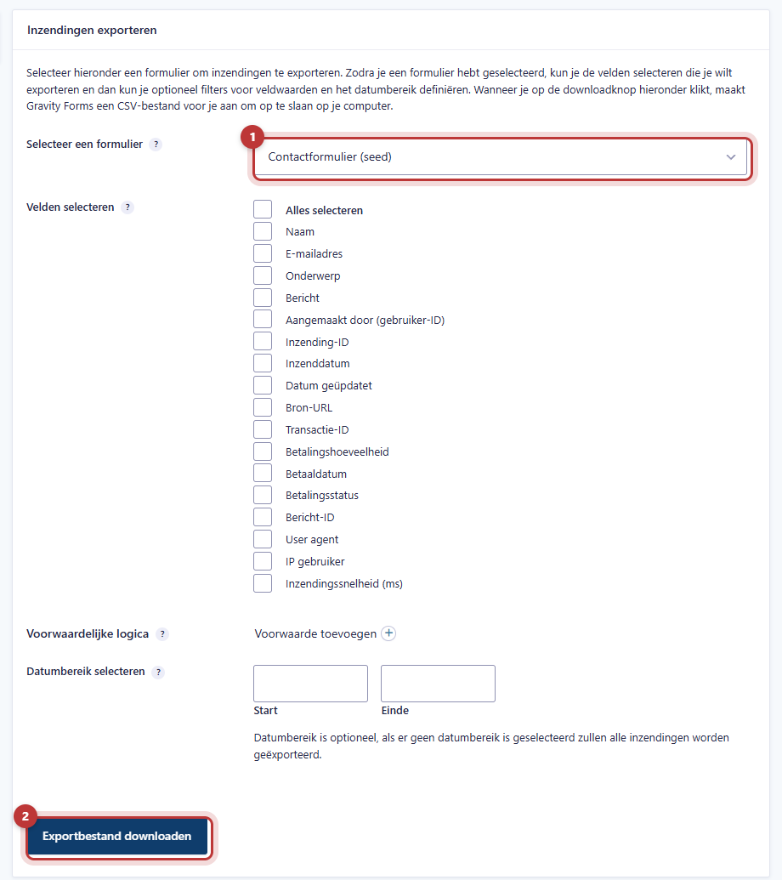
- Go to Forms → Import/export. The tab Export submissions is open.
- Select the form.
- Check the fields you want under Select fields.
- Optionally choose a Date range.
- Click on Download export file. You will receive a CSV file that you can open in Excel or Numbers.
Note: an export contains personal data. Do not keep the file longer than necessary, do not forward it casually, and delete it when you are done.
How long are submissions kept?
By default: 730 days, without IP address
For GDPR, you may not keep personal data longer than necessary. Therefore, leflite sets each form by default as follows:
- submissions are automatically permanently deleted after 730 days (two years) ;
- the IP address of the visitor is not stored.
A new form receives this setting immediately upon creation. Deletion occurs automatically once a day. As a result, a submission may sometimes remain for a day longer than exactly 730 days.
If an email is ever lost, you have two years to find the submission again. Keep what you need longer in your own administration or CRM.
Different for each form (for example, job applications)
For some forms, two years is too long. For job applications, for example, you usually only keep them for a few weeks. Here’s how to set a different period:
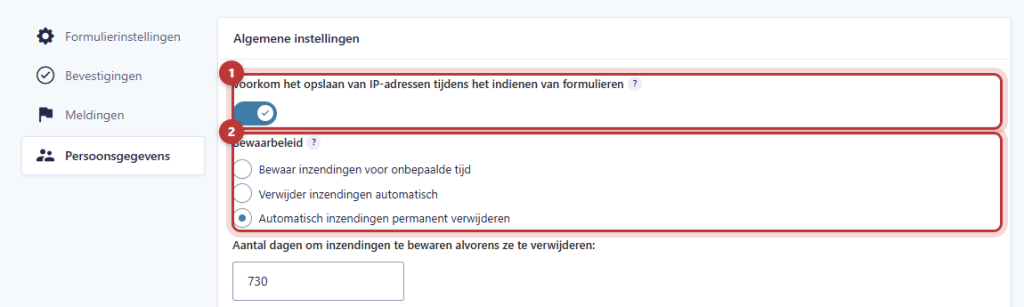
- Open the form, click on Settings and select the tab Personal Data.
- Keep Prevent storing IP addresses during form submissions checked.
- Choose Retention policy for Automatically permanently delete submissions and fill in the number of days, for example 28.
- Save the settings.
Good to know: if you store the Personal Data of a form yourself, the theme will leave that form alone from that moment on. Your retention period will then remain in place. If you choose Keep submissions indefinitely, nothing will be automatically deleted anymore. Only do this if you have a good reason for it.
A consent checkbox
If you ask for data in a form that you also want to use for something else, such as a newsletter, you need consent. Gravity Forms has the field Consent under Advanced fields: a checkbox with text and a link to your privacy statement. For a regular contact form, a short sentence under the button with a link to your privacy statement is usually sufficient. If you are unsure what your form needs, seek advice from someone knowledgeable about GDPR.
Not working?
- You see no submissions. Check if the correct form is selected at the top, and also check under the Spam filter.
- An old request has disappeared. Submissions older than the retention period (default 730 days) are automatically deleted. They cannot be retrieved anymore.
- You are missing the IP address in a submission. That’s correct: the theme intentionally does not store it.
- The export opens with strange characters in Excel. Open Excel, choose Data → From text/CSV and select the encoding UTF-8.
Still having trouble? Contact us or call 06 35 66 47 73. We are happy to help.
Frequently asked questions
Submissions older than 730 days are automatically deleted. If you have set a shorter period per form, it will happen sooner.
Share this article
Robert Oosterloo
Robert Oosterloo is eigenaar en UX/UI-designer van Lef Creative in Kollum. Hij ontwerpt websites, webshops en software voor ondernemers in Noord-Nederland.
Read also
How do I ensure that the email from my website arrives?
How do I set who receives the form messages?
I’m not receiving messages from my form: what now?






Want a website like this?
Here you can read how easy it is to maintain a leflite site yourself. Want one too? We will think along with you, no strings attached.
Prefer direct contact? Call Robert at 06 35 66 47 73 or send a WhatsApp.