
Why do I need to confirm my login via email?
- Leflite theme

Robert Oosterloo
Updated on · 5 min read
If you log in from a location where you haven’t logged in before, your website will ask you to confirm this via an email first. It may seem cumbersome, but it keeps intruders out, even if they have your password. Here you can read how it works and what you need to do.
In short
- When you log in from a new IP address, you will first receive an email with a confirmation link.
- In the email, you choose: Trust this location permanently or trust the location for 7 days.
- The links in the email are valid for 1 hour. After that, you log in again.
- This applies only to people who can modify the website, not to customers of a webshop.
Why this extra step?
A password can leak, for example, if you use it elsewhere. With just that password, an intruder can’t do anything on your website: they also need access to your mailbox to confirm the new location. Your website recognizes a location by the IP address of the internet connection you log in with.
Who does this apply to?
The check applies to everyone who can change something on the website: administrators, editors, authors, writers, and in a webshop, also store managers. Customers of a webshop who only view their orders can log in directly.
The check is enabled on your live website. You won’t encounter it on a test version of your site.
No website on leflite yet?
We will build it together with you. After that, you can adjust everything yourself, just like in this article.
- Online within a week
- Hosting, SSL, and backups included
- Starting from €49,95 per month
Step 1: Log in as usual
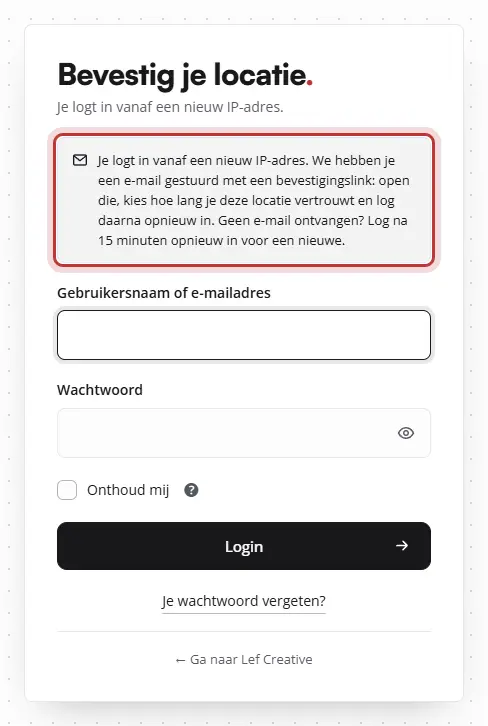
Go to the login screen and log in with your username and password (see logging in to your website). If your location is new, you won’t enter the dashboard. The login screen will then be called Confirm your location, with this message below in a box:
“You are logging in from a new IP address. We have sent you an email with a confirmation link: open it, choose how long you trust this location, and then log in again. Didn’t receive an email? Log in again after 15 minutes for a new one.”
Step 2: Open the email with the confirmation link
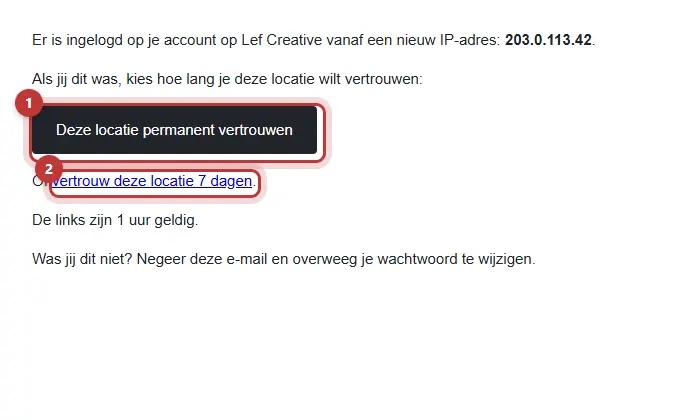
You will receive an email at your account’s email address, with the subject being the name of your website and New login location detected. The email contains the IP address from which you logged in.
Step 3: Choose how long you trust this location
Was it you? Then choose one of the two links:
- Trust this location permanently: for a fixed place, like your office or home.
- Trust this location for 7 days: for a place where you are only briefly, like a hotel or a client’s wifi.
Step 4: Log in again
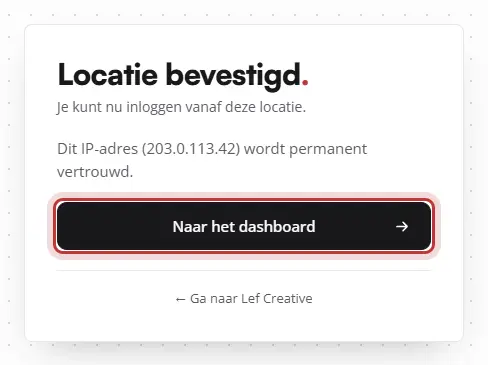
After clicking, you will see the page Location confirmed: “You can now log in from this location.” Below it states whether this IP address is trusted permanently or for 7 days. Click on Go to the dashboard and log in again. Now you will be able to enter.
Note:Did you receive this email while you were not trying to log in? Then do not click on the links. Someone else may know your password: change it immediately via your profile and let us know.
Good to know
Home, at the office, and on your phone are different locations
Each internet connection has its own IP address. If you work at the office, at home, and on your phone via 4G, you will confirm three locations. On a mobile network, the IP address often changes; the question may come up more frequently. A new router or a different internet provider also gives a new address.
Locations that you haven’t used for 6 months will expire
A trusted location from which you haven’t logged in for 6 months will be automatically removed. A temporary location expires after 7 days. After that, the website will ask for confirmation again.
View your trusted locations
In your profile (top right on your name, then Profile) there is the block Trusted IP addresses, with the status and last login for each address. There you can also Remove an address.
Having trouble?
- Didn’t receive an email: check your spam. The website will only send a new email after 15 minutes if you log in again; trying again earlier will not send a new email.
- “Link invalid” or “This confirmation link no longer works”: the link is older than an hour or has already been used. Log in again to receive a new one.
- The question keeps coming back: your internet connection is changing IP addresses (often with mobile internet or a VPN). Choose 7 days, or have an administrator add your fixed address in your profile.
- You cannot access your account’s mailbox: have a website administrator change the email address in your profile, or contact us.
- A new colleague will get the prompt the first time they log in: that is normal. See also adding a user.
For more on how to keep your site secure, read keeping your website safe and up-to-date.
Frequently asked questions
No. Only at a new location, or if the 7 days have passed.
No. Only users who can modify the website will receive this check.
Share this article
Robert Oosterloo
Robert Oosterloo is eigenaar en UX/UI-designer van Lef Creative in Kollum. Hij ontwerpt websites, webshops en software voor ondernemers in Noord-Nederland.
Read also
Finding your way in the dashboard
Page or post?
Draft, preview, and previous versions






Want a website like this?
Here you can read how easy it is to maintain a leflite site yourself. Want one too? We will think along with you, no strings attached.
Prefer direct contact? Call Robert at 06 35 66 47 73 or send a WhatsApp.