
How do I adjust the footer and the bottom bar?

Robert Oosterloo
Updated on · 4 min read
The footer is at the bottom of every page. It consists of columns with, for example, your contact details and a menu, with a narrow bar below it: the socket. You set the shape in the General options, and the content in the widgets.
In short
- Color, number of columns, and widths: General options, tab Footer.
- The content of the columns: Widgets, areas Footer section 1, 2, and so on.
- Always use the shortcodes for phone, email, and address. Then they will be correct everywhere.
- The socket has its own color and its own menu (Socket menu).
Step 1: Go to General options → Footer
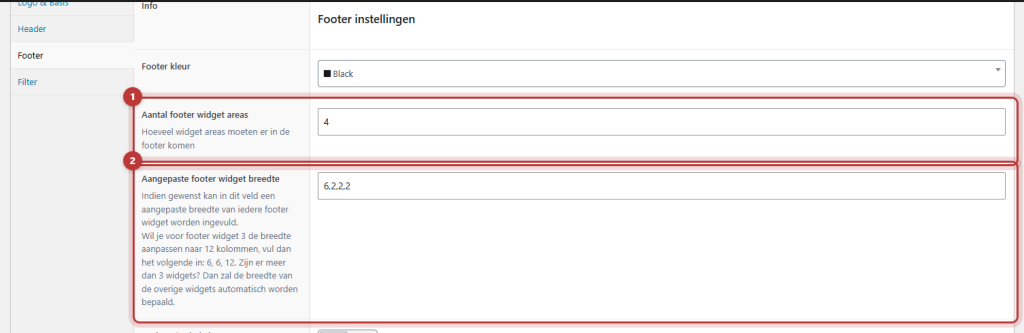
Open General options and click on the tab Footer. You will see the options Footer color, Number of footer widget areas, Custom footer widget width, Disable socket, and Socket color. Under Extra, there are a few additional options. After making changes, click Update.
Nog geen website op leflite?
Wij bouwen hem samen met jou. Daarna pas je alles zelf aan, precies zoals in dit artikel.
- Online binnen een week
- Hosting, SSL en back-ups inbegrepen
- Vanaf €49,95 per maand

Footer color
Choose a color from your brand style for Footer color. The text color will automatically adjust to ensure it remains readable.
Number of columns
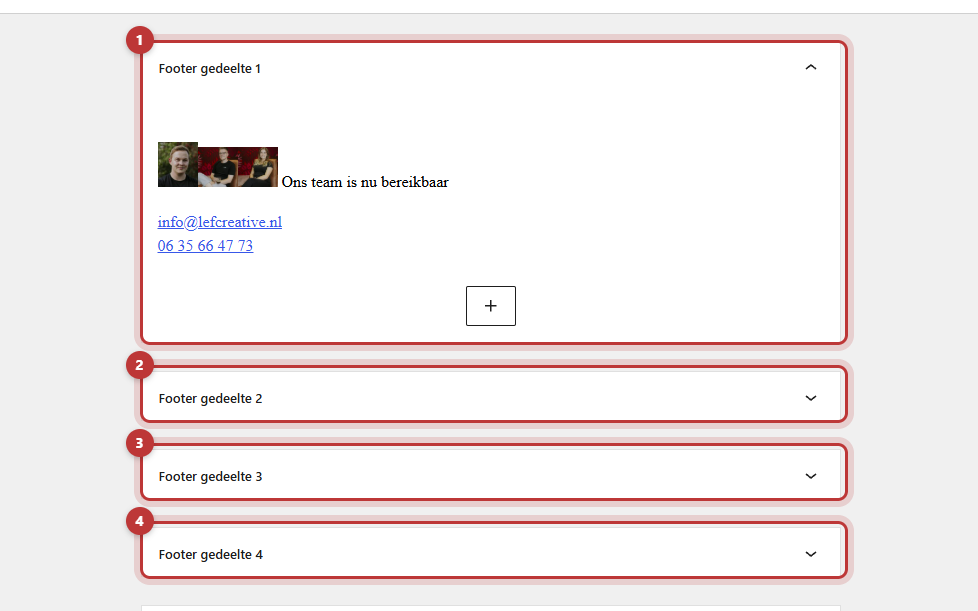
In Number of footer widget areas, enter how many columns the footer has. By default, there are 4. Each column is a widget area in Widgets: Footer section 1, Footer section 2, and so on.
Custom widths, for example 4,3,3,2
Without custom width, all columns are the same width. If you want a wider first column, enter the widths in Custom footer widget width, separated by commas. The total width is 12. A few examples with 4 columns:
3,3,3,3: four equally wide columns.4,3,3,2: the first column slightly wider, the last narrower.6,2,2,2: a wide first column, for example for your logo and a short text.
Always specify all widths
If you enter fewer widths than there are columns, the website will determine the rest itself. This can sometimes result in unexpected outcomes, such as a half-empty row. Therefore, fill in a width for each column, ensuring they add up to 12. On mobile, the columns will always stack vertically.
The content: Widgets
You place the text, links, and menus in the columns in Widgets. Expand Footer section 1 and add a block. You can read how to do this in filling the footer with widgets.
Your contact details: use shortcodes
Do not type your phone number, email address, and address manually, but use the shortcodes, such as [theme_option field="company_phone"]. They pull the data from Company details. Phone and email will then automatically become clickable. If your number changes, you only need to update it in one place, and it will be correct everywhere. Read how to change your phone number, email, or address site-wide and how to automatically insert your phone number into text.
The socket: color, menu, and disabling it
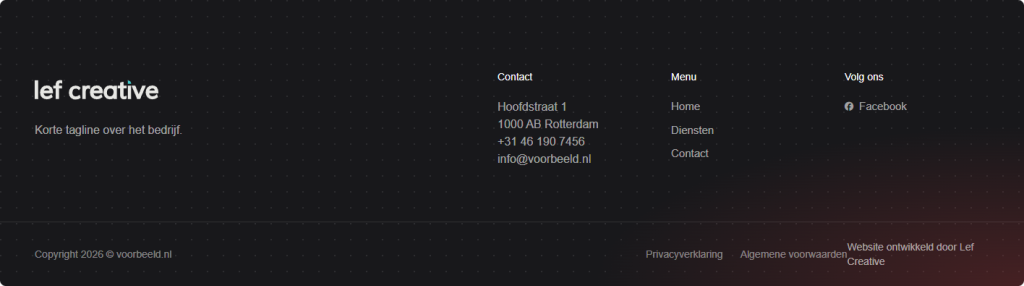
The socket is the narrow bar at the very bottom.
- Socket color: a unique color. Choose Transparent if it should have the same color as the footer.
- Socket menu: a small menu, for example with your privacy policy and terms and conditions. Create it in Menus and link it to the location Socket menu.
- Disable socket: if you enable this, there will be no socket.
The copyright text
On the left in the socket, it says ‘Copyright’, the current year, and your domain name. The year updates automatically. On the right, it says ‘Website developed by Lef Creative’. These texts are fixed in the theme. If you want them to be different, contact us.
More in the Footer tab
- Back to top button: a button at the bottom right that allows visitors to go back to the top. Note: it is in the same position as a WhatsApp button on the right. See a WhatsApp button on your website.
- General builder above footer: a section that appears on every page above the footer, such as a contact block. Read a section above the footer on every page.
Having trouble?
- A column is on a new line. The widths together exceed 12, or you have not filled in all the widths.
- There are more or fewer footer areas than you expect. Adjust Number of footer widget areas and save. Then refresh Widgets.
- A column is empty. The corresponding Footer section has no widget. Add one.
- The socket menu is missing. Link a menu to the location Socket menu.
- Your old phone number is still in the footer. It is typed instead of using the shortcode. Replace it with the shortcode.
- Can’t figure it out? contact us.
Frequently asked questions
That text is fixed in the theme. Contact us if you want it to be different.
Share this article
Robert Oosterloo
Robert Oosterloo is eigenaar en UX/UI-designer van Lef Creative in Kollum. Hij ontwerpt websites, webshops en software voor ondernemers in Noord-Nederland.
Read also
Create a subpage
An anchor link to a section
A search function on your website






Want a website like this?
Here you can read how easy it is to maintain a leflite site yourself. Want one too? We will think along with you, no strings attached.
Prefer direct contact? Call Robert at 06 35 66 47 73 or send a WhatsApp.