
What is the difference between a synced and an unsynced pattern?

Robert Oosterloo
Updated on · 4 min read
Every builder on your website is synced or unsynced. The difference determines whether you adjust a pattern in one place or per page. A wrong choice will cost you a lot of work later. With this article, you make the right choice immediately.
In short
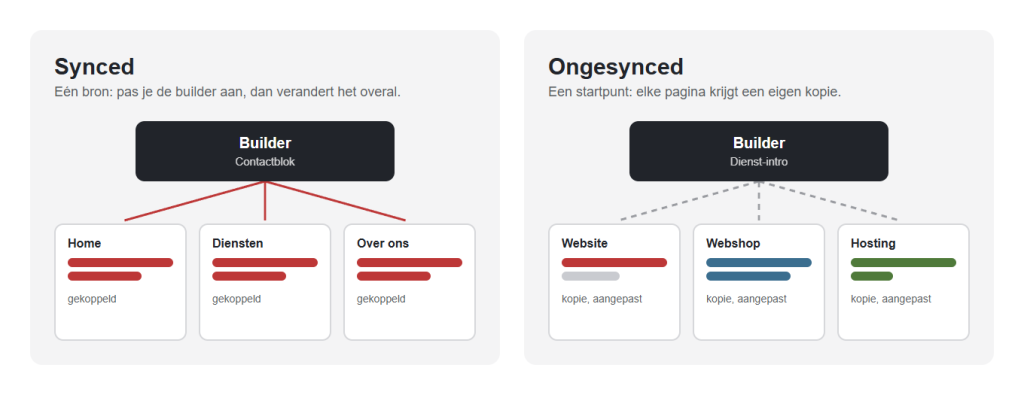
- Synced: one source. The page always shows the builder; you only make adjustments in the builder.
- Unsynced (default): a copy. You adjust it per page, separate from the builder.
- Synced for what needs to be the same everywhere: contact block, call to action, reviews.
- Unsynced for a starting point that differs per page: a service intro, a pricing block.
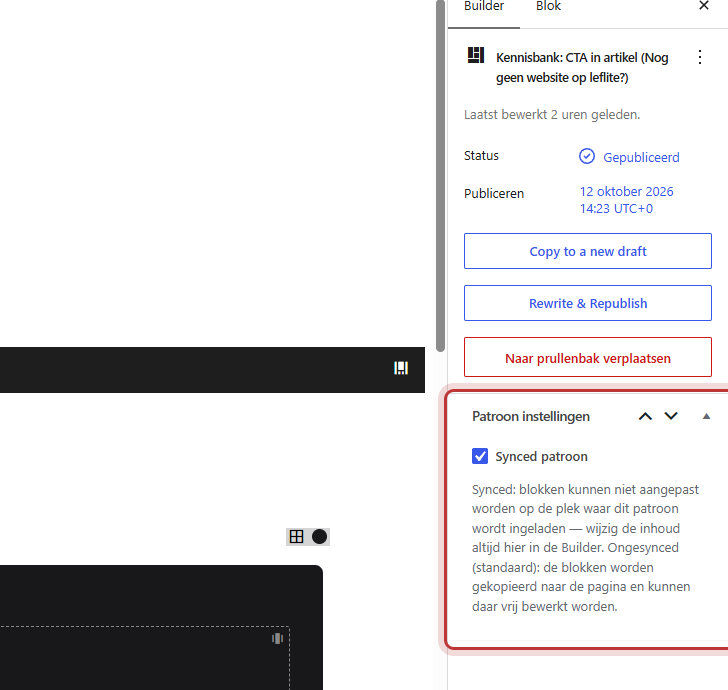
- Set in the builder with the checkbox Synced pattern.
Synced: one source, the same everywhere
With a synced pattern, there is no copy on your page, but a reference to the builder. Your visitor always sees the current content from the builder. If you adjust the builder, the pattern changes on all pages at once.
On the page itself, you cannot edit a synced pattern. In the editor, you can see the content, labeled Synced builder pattern, but clicking in the text does not work.
Unsynced: a starting point
With an unsynced pattern, the sections and blocks are placed as copies on your page. After that, they are regular sections: you can adjust the text, photos, and colors as you wish. The builder remains unchanged. If you later adjust the builder, nothing changes on the pages where you have already placed it.
Nog geen website op leflite?
Wij bouwen hem samen met jou. Daarna pas je alles zelf aan, precies zoals in dit artikel.
- Online binnen een week
- Hosting, SSL en back-ups inbegrepen
- Vanaf €49,95 per maand

Examples
Synced: contact block, call to action, reviews
- A contact block with your phone number, address, and a button. If something changes, it is immediately correct everywhere.
- A call to action (“Request a quote”) at the bottom of your service pages.
- A section with reviews or certifications that appear on multiple pages.
- A temporary promotion that you want to adjust or remove everywhere at once.
Unsynced: service intro, pricing block
- An intro at the top of each service page, with the same structure but different text and photo per service.
- A pricing block or comparison table that you fill in per page.
- A fixed structure for new pages, as a starting point to fill in.
Make a builder synced or unlink it
Open the builder via Builders → All builders. Check the box Pattern settings on the right for Synced pattern and click Save. The explanation under the checkbox summarizes it: “Synced: blocks cannot be edited at the location where this pattern is loaded — always change the content here in the Builder. Unsynced (default): the blocks are copied to the page and can be freely edited there.”
What happens to existing pages?
- If you set an unsynced builder to synced: pages where you previously placed it as a copy will remain copies. Only new insertions will be linked.
- If you set a synced builder to unsynced: synced patterns that are already in pages will remain linked and still show the builder. For new insertions, you will get a copy. If you want to unlink an existing linked pattern, you do so per page.
- If you adjust a synced builder: all linked locations will change as well, immediately after Save.
You can read how to unlink in adjusting or unlinking a synced pattern.
Unsure?
Ask yourself the question: does this need to be exactly the same on every page in six months? Yes: choose synced. No, or “almost the same”: choose unsynced.
How to create and place a pattern, you can read in creating a pattern from a section and adding a pattern to a page. The complete overview is in what are builders and patterns.
Can’t figure it out? Contact us.
Frequently asked questions
Synced. Then you adjust it once and it is correct on every page.
Yes. Unlink it on that page with Unlink at this location. It will then become a regular copy, while the other pages remain linked.
Share this article
Robert Oosterloo
Robert Oosterloo is eigenaar en UX/UI-designer van Lef Creative in Kollum. Hij ontwerpt websites, webshops en software voor ondernemers in Noord-Nederland.
Read also
Builders and patterns explained
Adjusting or unlinking a synced pattern
Adjusting an overview page






Want a website like this?
Here you can read how easy it is to maintain a leflite site yourself. Want one too? We will think along with you, no strings attached.
Prefer direct contact? Call Robert at 06 35 66 47 73 or send a WhatsApp.