
What are builders and patterns?

Robert Oosterloo
Updated on · 4 min read
Some components appear on many pages: a contact block, a call to request a quote, your reviews. In your leflite website, you create such a component once as a builder, and then place it everywhere as a pattern. Here you can read how it works.
In short
- A builder is a saved set of sections and blocks. You can find them under Builders in the left menu.
- On a page, you place a builder with + Add Pattern.
- Synced: the same content everywhere, edit in one place. Unsynced: a copy that you edit per page.
- Builders are also used above the footer, above and below overview pages, and below products.
Nog geen website op leflite?
Wij bouwen hem samen met jou. Daarna pas je alles zelf aan, precies zoals in dit artikel.
- Online binnen een week
- Hosting, SSL en back-ups inbegrepen
- Vanaf €49,95 per maand

A builder in one sentence
A builder is a piece of a page (one or more sections with blocks) that you save separately so you can reuse it in other places. You create and edit a builder in the same editor as a page, with the same sections, columns, and blocks.
Why reuse?
- Work faster: you build a new page from components that already exist.
- Consistent everywhere: if your phone number or your promotion changes, you only adjust it once.
- A fixed style: every page uses the same structure, so your website remains cohesive.
Synced and unsynced
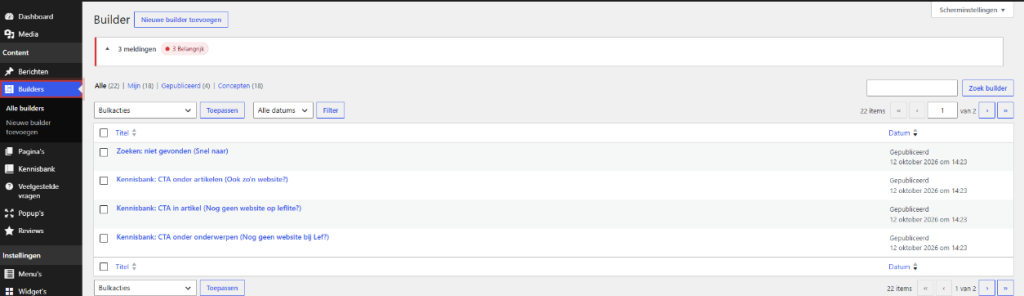
Each builder is synced or unsynced. You set this in the builder itself, in the box Pattern Settings with the checkbox Synced Pattern.
- Synced: the page always shows the current content of the builder. You cannot edit it on the page. If you change the builder, it changes on all pages at once.
- Unsynced (default): the sections are placed as a copy in your page. You can edit them freely. Later changes in the builder will not appear on that page.
Which one you choose, you can read in the difference between a synced and an unsynced pattern.
Where do you use builders?
On a page: + Add Pattern
At the bottom of the editor, next to + Add Section is the button + Add Pattern. With that, you choose a builder and place it in your page. See adding a pattern to a page. A section you have already created can be saved as a builder with Create Pattern, see making a pattern from a section.
Above the footer on every page
In General Options, tab Footer, you choose under General Builder Above Footer one or more builders that appear on every page above the footer. See placing a section on every page above the footer.
Above or below an overview page
In the Archive Settings of a content type, you choose builders at the top and bottom of the overview. For your blog, you do this on the post page with Blog Archive Outro Builder. See customizing an overview page.
Below a product (webshop)
If you have a webshop, you can show extra sections below a product page with a builder: see extra sections below a product page.
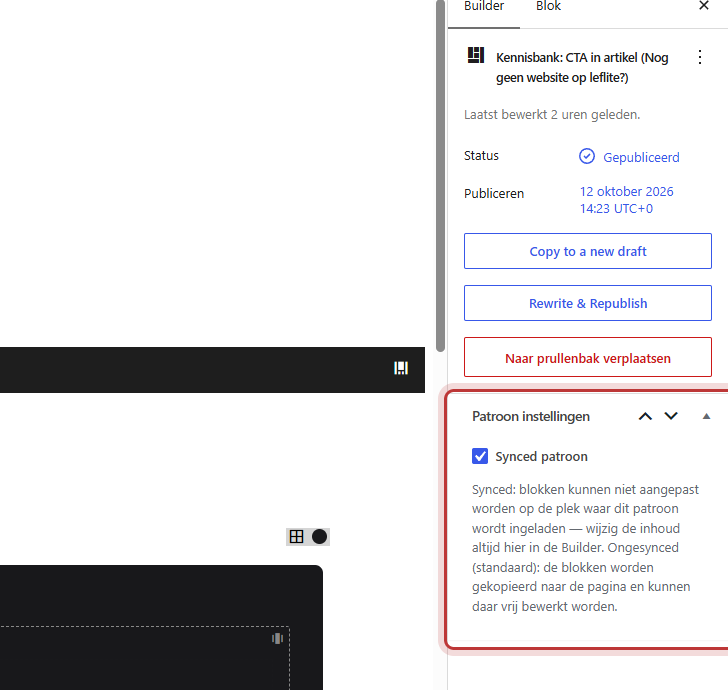
Manage Builders
Go to Builders → All Builders for an overview. You create a new builder with Add New. Give each builder a clear name, such as “CTA Request a Quote” or “Contact Block”: you will search for that name later when you use + Add Pattern. Only published builders can be used as patterns.
Note: do not delete a builder that is still used as a synced pattern in a page, or that has been chosen above the footer or in an overview. The content will then disappear from those places.
Good to know: WordPress also has “patterns”, but those are turned off in your leflite website. You only work with builders. This way, everything is in one place.
All articles about builders
- How do I add a pattern to a page?
- How do I create a pattern from a section?
- What is the difference between a synced and an unsynced pattern?
- How do I edit a synced pattern or make it unsynced on one page?
- How do I place a section on every page above the footer?
- How do I edit an overview page (archive)?
Frequently Asked Questions
The idea is the same, but leflite uses its own builders. The patterns from WordPress itself are turned off.
Share this article
Robert Oosterloo
Robert Oosterloo is eigenaar en UX/UI-designer van Lef Creative in Kollum. Hij ontwerpt websites, webshops en software voor ondernemers in Noord-Nederland.
Read also
Adjusting or unlinking a synced pattern
Adjusting an overview page
Creating a template from a section






Want a website like this?
Here you can read how easy it is to maintain a leflite site yourself. Want one too? We will think along with you, no strings attached.
Prefer direct contact? Call Robert at 06 35 66 47 73 or send a WhatsApp.