
How do I change my logo and favicon?

Robert Oosterloo
Updated on · 4 min read
Your logo is located in the top left corner of the header on every page. The favicon is the small icon in the browser tab. You can replace both in one place, in the General options.
In short
- Go to General options, tab Logo & Basics.
- Replace the image at Logo and at Favicon.
- Use an SVG or PNG with a transparent background for the logo, and a square image for the favicon.
- The height of the logo is fixed in your brand style.
Nog geen website op leflite?
Wij bouwen hem samen met jou. Daarna pas je alles zelf aan, precies zoals in dit artikel.
- Online binnen een week
- Hosting, SSL en back-ups inbegrepen
- Vanaf €49,95 per maand

What do you need?
- Logo: preferably an SVG file. If that’s not possible, use a PNG with a transparent background, large enough (for example, 600 pixels wide) to keep it sharp. Crop any empty edges.
- Favicon: a square image, for example, just the icon of your logo. The website will make it a small square. Long or landscape logos will become unreadable.
Step 1: Go to General options → Logo & Basics
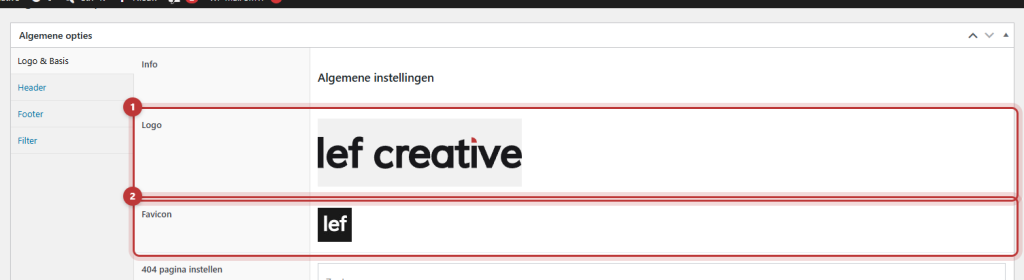
Click on General options in the left menu. The tab Logo & Basics will be open first.
Step 2: Replace the logo
Hover over the current logo at Logo and click on the pencil icon, or remove it with the cross and click the button to add an image. Choose a file from the media library or upload a new file. For information on how to upload, see uploading images in the correct format.
Step 3: Replace the favicon
Do the same for Favicon. If you leave the favicon empty, the website will use your logo as the favicon. With a wide logo, this is often unreadable, so it’s better to fill it in.
Step 4: Save and check
Click on Update. Open your website in a new tab and check the logo at the top, also on your phone. The favicon may take a while to appear, as browsers cache it for a long time. If you still see the old one, open your website in a private window.

The logo is too big or too small
The height of the logo is fixed in your brand style. The width adjusts accordingly. A wide logo will become wider, and a tall logo will become narrower. If your logo seems small, first check if there is empty space around it in the file: crop that away. If the height needs to be adjusted, we will change that in your brand style. contact us.
Logo in the footer or in a text
Do you want the logo in the footer or on a page? Use the shortcode [theme_option field="theme_logo"] in a Text block or footer widget. This will display the logo from the General options. If you replace your logo later, it will change there as well. A logo with white letters for a dark footer can also be placed as a regular image.
Do you have a webshop? Then your new logo will also appear in the emails from your webshop, unless Business details do not synchronize to WooCommerce is enabled under Webshop.
Tip: if your logo doesn’t fit well with a transparent header over a dark photo? Then read setting the header. New colors with your new logo? See colors and fonts.
Having trouble?
- You still see the old logo. Did you click on Update? Refresh the page or clear the cache.
- The logo has a white border or area. The file does not have a transparent background. Use a PNG with transparency or an SVG.
- The logo is blurry. The file is too small. Upload a larger version or an SVG.
- The favicon remains the old one. Browsers cache favicons for a long time. Check in a private window.
- You cannot upload an SVG. That option is not enabled on your website. contact us.
Frequently Asked Questions
The height is fixed in your brand style. First, crop any empty edges from the file. If the height needs to be adjusted, we will do that for you.
Share this article
Robert Oosterloo
Robert Oosterloo is eigenaar en UX/UI-designer van Lef Creative in Kollum. Hij ontwerpt websites, webshops en software voor ondernemers in Noord-Nederland.
Read also
Automatically inserting phone number in text
Giving a section a background color
A search function on your website






Want a website like this?
Here you can read how easy it is to maintain a leflite site yourself. Want one too? We will think along with you, no strings attached.
Prefer direct contact? Call Robert at 06 35 66 47 73 or send a WhatsApp.