
Can I change the colors and fonts of my website myself?

Robert Oosterloo
Updated on · 3 min read
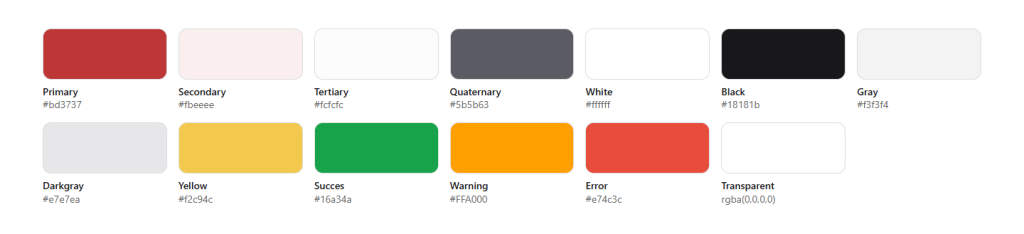
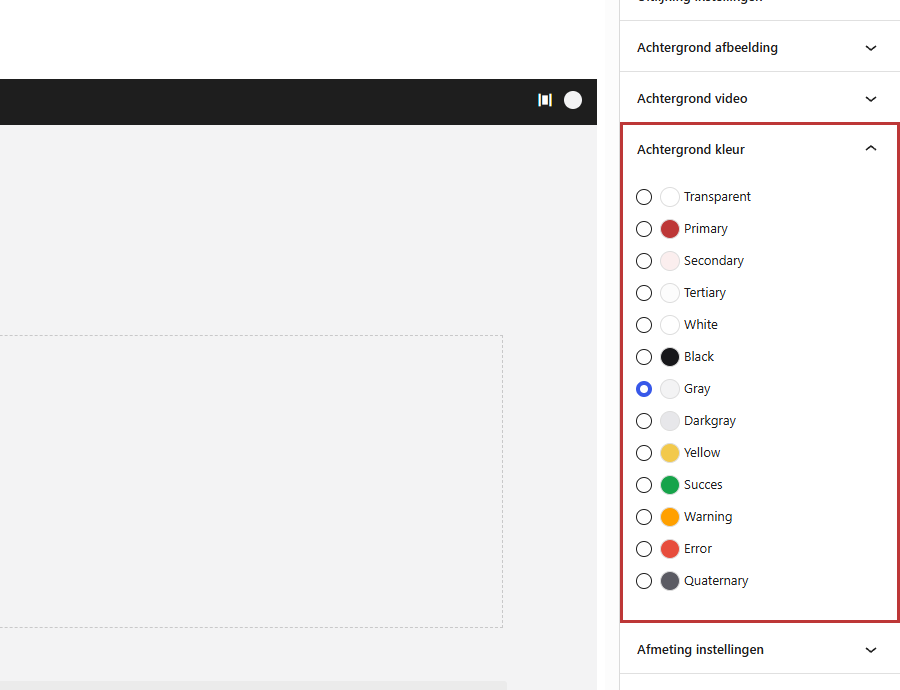
Wherever you choose a color on your website, you will see the same row of colors. These are the colors of your brand identity. You select from these, but you do not add any new colors or fonts yourself. This way, your website remains on-brand, no matter who is working on it.
In short
- Short answer: you choose colors from your brand identity. We adjust the brand identity itself.
- The colors have fixed names, such as Primary, Secondary, and Gray.
- Each background color has a text color that is easy to read.
- Fonts are also fixed in the brand identity.
Where do the colors come from?
When building your website, we establish your brand identity: your colors, fonts, the rounding of buttons, and more. All color pickers on your website read these colors. If a color in the brand identity changes, it changes across the entire website at once.
The names of the colors
The colors have English names. Which color corresponds varies by website. Usually, you see:
- Primary: your main color, for example, for buttons.
- Secondary and Tertiary: your second and third colors. Sometimes there is also Quaternary.
- White, Black, Gray, and Darkgray: neutral colors.
- Yellow, Success (green), Warning (orange), and Error (red): for notifications and accents.
- Transparent: no color, the background underneath remains visible.
Each color has a corresponding text color. If you choose a dark background, the text automatically becomes light, and vice versa.
Where do you choose a color?
- The Background color of a section. See how to give a section a background color.
- The Card background color of a column displayed as a card.
- The Color of a button and the color of an icon.
- The background color of the block Note / notification.
- The color of the header, footer, top bar, socket, and notification in the General options.
- In the Text block, you color individual words with the button Add color in the toolbar. See using the Text block.
Nog geen website op leflite?
Wij bouwen hem samen met jou. Daarna pas je alles zelf aan, precies zoals in dit artikel.
- Online binnen een week
- Hosting, SSL en back-ups inbegrepen
- Vanaf €49,95 per maand

Why can’t you add a color yourself?
A custom color code per block may seem convenient, but after a while, your website ends up with ten nearly identical shades of blue. With fixed brand identity colors, everything matches, and the text remains readable because each color has a corresponding text color. That’s why you cannot enter a custom color in the color pickers.
Fonts
The fonts and sizes of headings and text are also fixed in your brand identity. In the Text block, you can choose between heading and regular text, but not a different font. This way, all pages look the same.
Adjusting brand identity
Do you have a new brand identity, want to add a color, or a different font? We will adjust that for you in your website’s brand identity. Then it changes everywhere at once, including in your logo and favicon if you send those along. Contact us. If you have a maintenance contract, read what it includes at WordPress maintenance.
Having trouble?
- You are missing a color. It is not in your brand identity. We can add it.
- Text is poorly readable on a color. Choose a different background color. If it remains difficult, let us adjust the text color in the brand identity.
- A color looks different than its name suggests. The names are fixed, the colors vary by website. Look at the color swatch, not the name.
- Can’t figure it out? Contact us.
Frequently Asked Questions
No. This keeps your website on-brand and ensures text readability. If you want to add a color, ask us.
Share this article
Robert Oosterloo
Robert Oosterloo is eigenaar en UX/UI-designer van Lef Creative in Kollum. Hij ontwerpt websites, webshops en software voor ondernemers in Noord-Nederland.
Read also
Automatically inserting phone number in text
Giving a section a background color
A search function on your website






Want a website like this?
Here you can read how easy it is to maintain a leflite site yourself. Want one too? We will think along with you, no strings attached.
Prefer direct contact? Call Robert at 06 35 66 47 73 or send a WhatsApp.