
Everything about the General options of your website

Robert Oosterloo
Updated on · 4 min read
Some things apply to your entire website: your logo, your phone number, the color of the header, your opening hours. You set these not per page, but in one place: the General options. Here you can read what is included and where to find the explanations.
In short
- You can find General options in the menu on the left in WordPress.
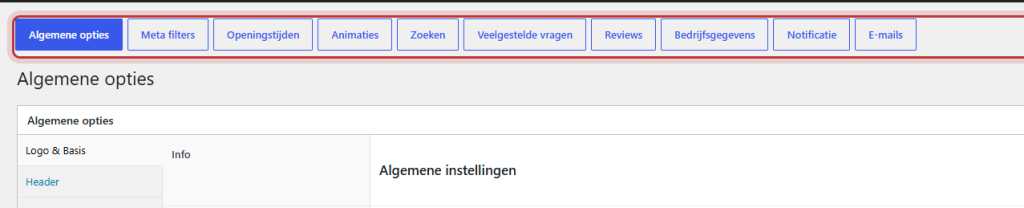
- At the top, there is a row of buttons for all sections.
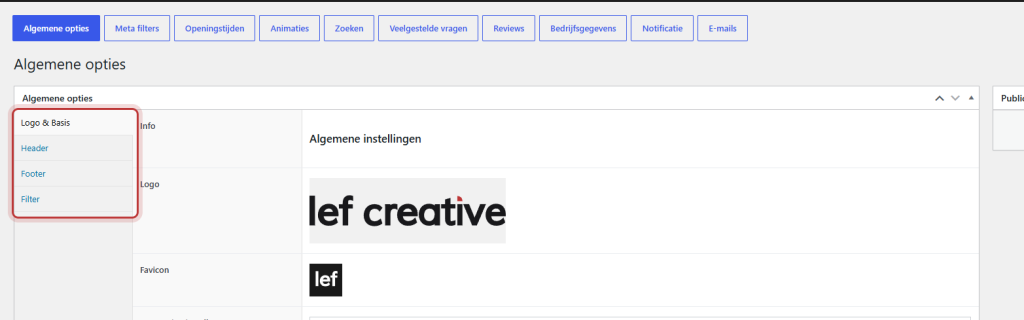
- The main page has four tabs: Logo & Basics, Header, Footer, and Filter.
- Save each page with Update.
Where do you find them?
Log in and click on General options in the left menu. An editor can also see and change the options. So only give such an account to people you trust. See add a user.
The buttons at the top
At the top of each page of the General options, there is a row of buttons. These allow you to jump to each section: the main page, Opening hours, Animations, Search, Company details, Notification, Emails, and the pages of the modules on your website. If your website has a webshop, you will also see Webshop and Delivery time.
The main page: Logo & Basics, Header, Footer, Filter
- Logo & Basics: set your Logo, your Favicon, and 404 page settings. See change your logo and favicon and set a custom ‘page not found’.
- Header: the top bar, the header, and the menu bar. See set the header.
- Footer: color and columns of the footer, the socket, the back to top button, and a section above the footer. See customize the footer.
- Filter: in Pagination option per post type, choose whether a content type overview works with page numbers (Pagination) or with a Load more button.
Nog geen website op leflite?
Wij bouwen hem samen met jou. Daarna pas je alles zelf aan, precies zoals in dit artikel.
- Online binnen een week
- Hosting, SSL en back-ups inbegrepen
- Vanaf €49,95 per maand

Company details and social media
You fill in your company name, address, phone, email, VAT number, and Chamber of Commerce number once in Company details. With a shortcode, you can place them in text or the footer, and they will be correct everywhere. On the Social media tab, you will find your profiles and the WhatsApp button. Read change your phone number, email, or address site-wide, link your social media, and add a WhatsApp button.
Opening hours
Fill in your regular opening hours and exceptional days, and display them with a shortcode. You can also show whether you are currently open. Read display your opening hours and show whether you are currently open.
Notification
A colored message under the menu on every page, with a start and end date. Read a notification at the top of your website.
Animations
Make columns fade in as visitors scroll. Read enable animations.
Search
Enable live search, with results as you type. Read add a search function to your website.
Emails
Customize the email that new users receive and the email for password recovery. Read adjust the emails for new users and password recovery.
Modules
Extra components, such as FAQs or reviews, each have their own page with a switch to enable them. Read which modules are available and how to enable them.
Webshop and Delivery time
If your website has a webshop, the settings for the store and delivery time are here. Read everything about your webshop.
The Back to top button
On the Footer tab, there is a Back to top button. If you enable it, a button with an upward arrow will appear in the bottom right corner as soon as a visitor scrolls down. The explanation for this field mistakenly refers to the sidebar of the search page; that is incorrect.
Note: a change in the General options applies immediately to the entire website. If you are unsure about a setting, first check the article about it. You cannot change the colors and fonts themselves here: see colors and fonts of your website.
All articles about branding and settings
- How do I change my logo and favicon?
- How do I change my phone number, email address, or address across the entire site?
- How do I link my social media to my website?
- How do I add a WhatsApp button to my website?
- How do I display my opening hours (including variations on holidays)?
- How do I show whether we are currently open?
- How do I place a notification at the top of my website?
- How do I enable animations on my website?
- How do I set up a custom ‘page not found’ (404)?
- How do I implement a search function on my website (including live search)?
- How do I customize the emails for new users and password recovery?
- Can I change the colors and fonts of my website myself?
Share this article
Robert Oosterloo
Robert Oosterloo is eigenaar en UX/UI-designer van Lef Creative in Kollum. Hij ontwerpt websites, webshops en software voor ondernemers in Noord-Nederland.
Read also
Automatically inserting phone number in text
Giving a section a background color
A search function on your website






Want a website like this?
Here you can read how easy it is to maintain a leflite site yourself. Want one too? We will think along with you, no strings attached.
Prefer direct contact? Call Robert at 06 35 66 47 73 or send a WhatsApp.