
How do I show if we are open now?

Robert Oosterloo
Updated on · 3 min read
A green dot with ‘We are open’ shows visitors that they can call or visit you now. Your website calculates this based on your opening hours. You choose the texts and place the status in a text, your menu, or the top bar.
In short
- The status comes from your opening hours. They must be filled in and activated.
- You set the texts in General options → Opening hours.
[openstatus]shows the dot and text,[open_indicator]only the dot.- Green = open, red = closed, orange = almost open or almost closed.
Nog geen website op leflite?
Wij bouwen hem samen met jou. Daarna pas je alles zelf aan, precies zoals in dit artikel.
- Online binnen een week
- Hosting, SSL en back-ups inbegrepen
- Vanaf €49,95 per maand

How does it work?
Your website looks at the day, the time (Dutch time), and your opening hours, including any exceptions. If you are open, you will see a green dot with your ‘open’ text. If you are closed, a red dot. If you want, it shows an orange dot with a custom text just before opening or closing.
Step 1: Are your opening hours filled in?
The status only works if Enable opening hours is turned on and your days are filled in. Read showing your opening hours.
Step 2: Set the texts
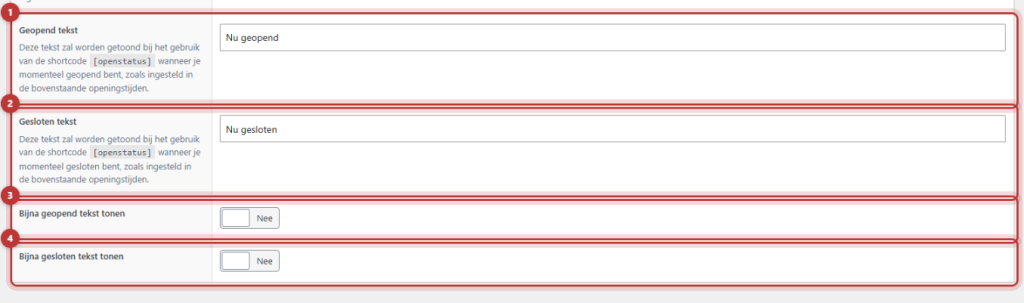
On the same page, under the opening hours, are the texts:
- Open text: for example, ‘Now open’. If you leave this empty, it will say ‘We are open!’.
- Closed text: for example, ‘Now closed’. Empty is ‘We are closed!’.
Almost open and almost closed
Enable Show almost open text for an orange status just before opening. Fill in the Almost open text (empty is ‘We will open soon’) and for Show almost open text from X minutes before opening how many minutes in advance, for example, 30. For closing, it works the same with Show almost closed text, Almost closed text and Show almost closed text from X minutes before closing. Click on Update.
Step 3: Place the status
In a text
Put [openstatus] in a Text block, for example, above your opening hours on the contact page. You will see the dot with the text. Only the dot? Use [open_indicator].
In the menu or the top bar
The shortcodes also work in a menu item. Go to Menus, add a Custom link to your contact page and set [openstatus] as Link text. Or put [open_indicator] for your own text, such as [open_indicator] Call us. See a button or icon in the menu.
In the top bar, the status works in the Top bar shortcode, the Top bar text and the USPs. See setting up a top bar. In Menu bar text shortcodes do not work; use Menu bar shortcode there.

⟦T0Note: the status uses the times at From and To. Your shopping evening does not count: during the shopping evening, the status shows ‘closed’. If you are often open in the evening, do not place the status prominently in your menu, or contact us.
Not working?
- You see the shortcode as text. Enable opening hours is off.
- You see nothing. Today has no entry in your opening hours. Add all seven days.
- The status is incorrect. Check your times and exceptional days. If your website uses caching, the status may lag a bit. Contact us if that persists.
- The orange dot does not appear. Enable Show almost open text or Show almost closed text and fill in the number of minutes.
- The status is not in the menu bar. You are using Menu bar text. Place it in Menu bar shortcode or in a menu item. Read organizing the menu bar.
Share this article
Robert Oosterloo
Robert Oosterloo is eigenaar en UX/UI-designer van Lef Creative in Kollum. Hij ontwerpt websites, webshops en software voor ondernemers in Noord-Nederland.
Read also
Automatically inserting phone number in text
Giving a section a background color
A search function on your website






Want a website like this?
Here you can read how easy it is to maintain a leflite site yourself. Want one too? We will think along with you, no strings attached.
Prefer direct contact? Call Robert at 06 35 66 47 73 or send a WhatsApp.