
How do I link my domain name to my website?

Robert Oosterloo
Updated on · 4 min read
Your new website is ready, but your domain name is still with another provider, for example, the registrar where you purchased the domain. Then you need to point the domain name to your new website. This can be done in two ways. In both cases, one thing is important: make sure your email continues to work.
In short
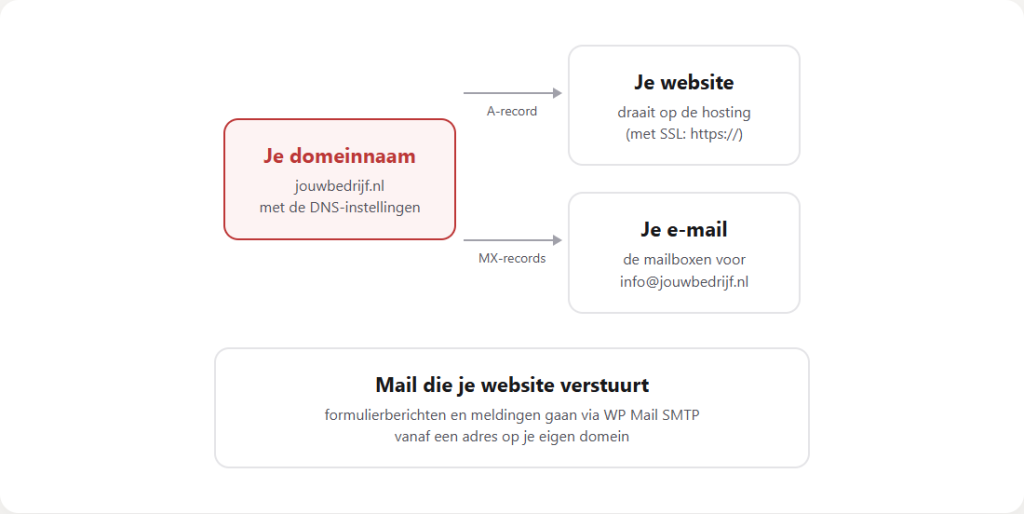
- Your domain is the address, the DNS is the address book, and the hosting is where your website is located.
- Option 1: you transfer the domain to Lef. We take care of the rest.
- Option 2: you only adjust the DNS records for your website with your current provider.
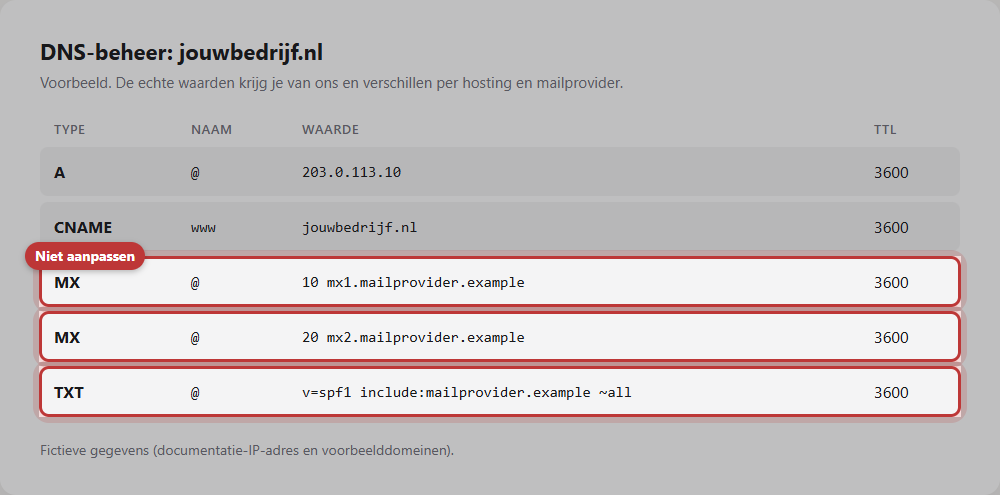
- Keep the MX records as they are, otherwise your email will stop working.
- A change is often visible within a few hours, but it can take up to a day.
Domain, DNS, hosting: what is what?
- Domain name: the address, for example, yourcompany.nl. You rent it annually from a registrar or through your web developer.
- DNS: the address book of your domain. It indicates where your website is located and where your mail comes in. Each line is called a record.
- Hosting: the server where your website runs.
Linking means: putting in the address book (the DNS) that your website is on our hosting.
Nog geen website op leflite?
Wij bouwen hem samen met jou. Daarna pas je alles zelf aan, precies zoals in dit artikel.
- Online binnen een week
- Hosting, SSL en back-ups inbegrepen
- Vanaf €49,95 per maand

Option 1: transfer the domain to Lef
The easiest way is to transfer the domain to us. Then you don’t have to do anything with the DNS yourself, and we have everything in one place. You usually need a transfer code (also known as a token or authorization code), which you request from your current provider. Do you want this? contact us. We will tell you exactly what we need and ensure that your website and email continue to work during the transfer.
Option 2: adjust the DNS records
Do you want to keep the domain where it is? Then you only adjust the records for your website with your current provider. You log in to that provider and look for DNS management or DNS settings.
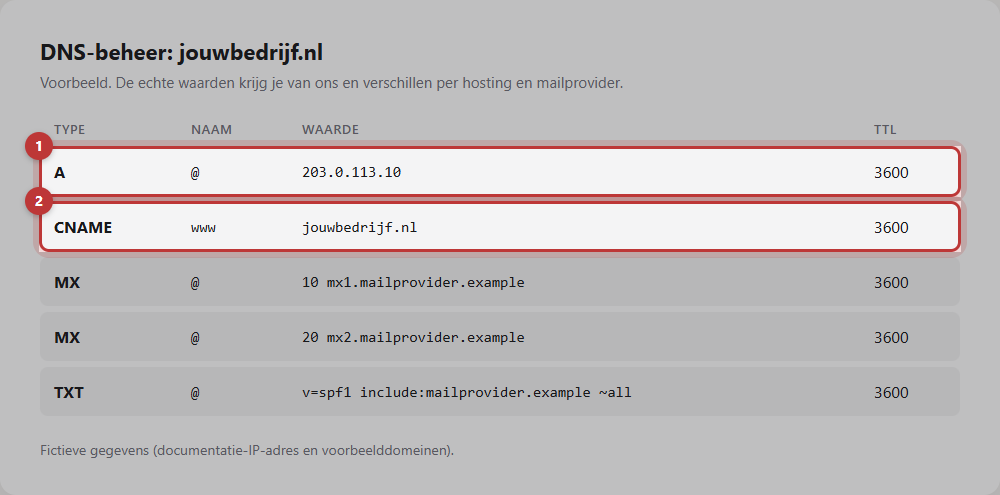
A record and www
The A record without a name (sometimes @) determines where yourcompany.nl goes. Additionally, there is usually a record for www (an A record or a CNAME). Both must point to your new website. You will receive the correct values from us: they differ per hosting, so always use the values we send you and not an example from the internet.
Be careful with your MX records (email)
The MX records determine where your email comes in. They have nothing to do with your website. Keep them as they are unless you are also moving your mail. If you accidentally change or delete them, no mail will come in. The same applies to other records related to your mail, such as TXT records for SPF or DKIM.
Note: take a screenshot of all your DNS records before you make any changes. If something goes wrong, you can revert it exactly to how it was.
How long does it take?
A DNS change is not visible everywhere at the same time. It often works within a few hours, but it can take up to a day before everyone sees your new website. During that time, some see the old website and others see the new one. That is normal. After the linking, we will take care of the SSL certificate, so that your website also works via https:// (see what an SSL certificate does).
Do you also want to arrange your mail differently or have an extra address? Then read request an extra email address or the overview everything about email, domain, and hosting.
Is it not working?
- You still see the old website after a day. Clear your browser cache or try it on your phone via 4G. Still the old one? Check the A record and the www record.
- yourcompany.nl works, but www.yourcompany.nl does not (or vice versa). One of the two records is missing or still points to the old location.
- You are not receiving any mail anymore. Check immediately if the MX records still match your screenshot from before the change and revert them.
- The browser shows “Not secure” after the linking. The certificate still needs to be created. Let us know.
- You don’t know which provider your domain is with. Look up your domain in the whois of SIDN (for .nl), or ask us.
Can’t figure it out? Contact us or call 06 35 66 47 73. We are happy to help.
Share this article
Robert Oosterloo
Robert Oosterloo is eigenaar en UX/UI-designer van Lef Creative in Kollum. Hij ontwerpt websites, webshops en software voor ondernemers in Noord-Nederland.
Read also
Customize welcome email and password email
Restoring a backup
How do I ensure that the email from my website arrives?






Want a website like this?
Here you can read how easy it is to maintain a leflite site yourself. Want one too? We will think along with you, no strings attached.
Prefer direct contact? Call Robert at 06 35 66 47 73 or send a WhatsApp.