
What does an SSL certificate do?

Robert Oosterloo
Updated on · 4 min read
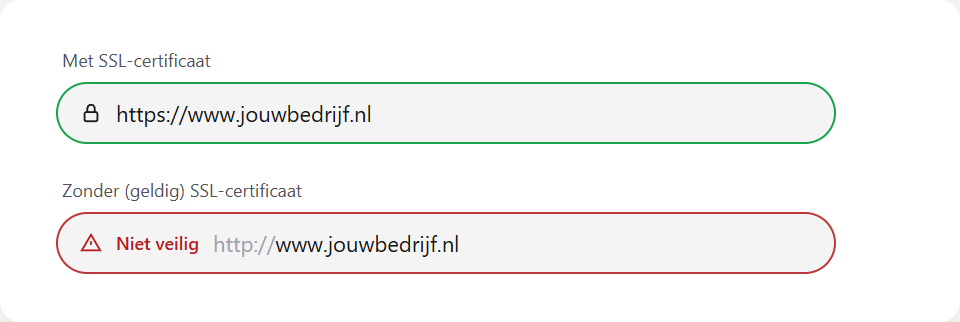
The padlock in the address bar and https:// for your web address: this comes from an SSL certificate. It ensures that no one can eavesdrop on what a visitor fills in on your website. Here you can read why it is necessary, how to see if you have it, and what to do if the browser says “Not secure”.
In short
- SSL encrypts the connection between the visitor and your website.
- You recognize it by the padlock and
https://in the address bar. - Without SSL, the browser shows “Not secure”, even with your forms.
- In Lef’s packages, an SSL certificate is included.
- “Not secure” despite SSL is often due to an old
http://link or image.
Why is SSL necessary?
- Privacy. Everything a visitor fills in, such as a name, email address, or message in your contact form, is encrypted over the internet. Without SSL, someone on the same wifi network could theoretically eavesdrop.
- Trust. Browsers like Chrome, Safari, and Edge label websites without SSL as “Not secure”. Visitors then drop off, especially if they need to fill something in.
- Google. Google uses https as one of the signals to evaluate websites. A website without SSL has a harder time.
- Webshop. For payments and customer accounts, a secure connection is a requirement.
Do I already have it?
Open your website and look in the address bar. Do you see a padlock (or in newer browsers a small settings icon) and does the address start with https://? Then you have a working SSL certificate. Click on the padlock: your browser will then show that the connection is secure.
If you host your website with Lef in one of our packages, the SSL certificate is included. You don’t have to do anything for it yourself. What is included in the packages can be found on our page about web hosting.
Nog geen website op leflite?
Wij bouwen hem samen met jou. Daarna pas je alles zelf aan, precies zoals in dit artikel.
- Online binnen een week
- Hosting, SSL en back-ups inbegrepen
- Vanaf €49,95 per maand

“Not secure” in the browser: causes
Do you still see “Not secure” or a strikethrough padlock? This can have several causes:
- You are visiting the website via
http://. Type the address withhttps://and see if it works then. - The certificate has expired or does not belong to the address. For example, if your domain has just been linked or moved. See linking your domain. We will resolve this.
- Mixed content. The page itself is secured, but there is something on it that is loaded via
http://. See below.
Mixed content (http images)
If an image, video, or script is loaded via a regular http:// address on a secure page, the browser does not consider the page completely secure. This often happens with:
- an old link to an image in text that still starts with
http://; - code that you pasted into a Code block, such as a map or a widget from another website (see placing a Google Maps map or other code).
Change such an address to https://. If the image or widget no longer works, then that other website does not support https; look for an alternative.
Note: do not ignore “Not secure”, especially not on a page with a form. Visitors see the warning too and are less likely to fill in the form.
Who takes care of it?
If your website is with Lef, we take care of the SSL certificate. Do you see “Not secure” and it is not due to an old http link in your own text? contact us, and we will check it. If your website is elsewhere, your hosting provider will arrange the certificate. You can read more about keeping your website secure in keeping your website safe and up-to-date, and an overview of domain, email, and hosting in everything about email, domain, and hosting.
Is it not working?
- “Not secure” on one page. Search that page for images, videos, or code with
http://and change them tohttps://. - “Not secure” on the entire website. Try the address with
https://. If it persists, contact us. - A message that the certificate is invalid or expired. We will resolve this. Send us a screenshot of the message.
Can’t figure it out? Contact us or call 06 35 66 47 73. We are happy to help.
Share this article
Robert Oosterloo
Robert Oosterloo is eigenaar en UX/UI-designer van Lef Creative in Kollum. Hij ontwerpt websites, webshops en software voor ondernemers in Noord-Nederland.
Read also
Customize welcome email and password email
Restoring a backup
How do I set who receives the form messages?






Want a website like this?
Here you can read how easy it is to maintain a leflite site yourself. Want one too? We will think along with you, no strings attached.
Prefer direct contact? Call Robert at 06 35 66 47 73 or send a WhatsApp.