
What is the difference between a page and a post?

Robert Oosterloo
Updated on · 3 min read
In WordPress, you create new content as page or as post. They look similar: you build them with the same sections, columns, and blocks. However, they are intended for different purposes. Here you can read when to choose what.
In short
- A page is for static content: About Us, Services, Contact.
- A post is for news and blogs: with a date, category, and featured image.
- Pages are organized under a parent page; posts are organized with categories.
- Posts are automatically displayed on a page with the block Featured.
In short
Does the content remain the same for a long time and should it be in your menu? Create a page. Is it news, a blog, or an update related to a specific moment? Create a post.
A page: static content
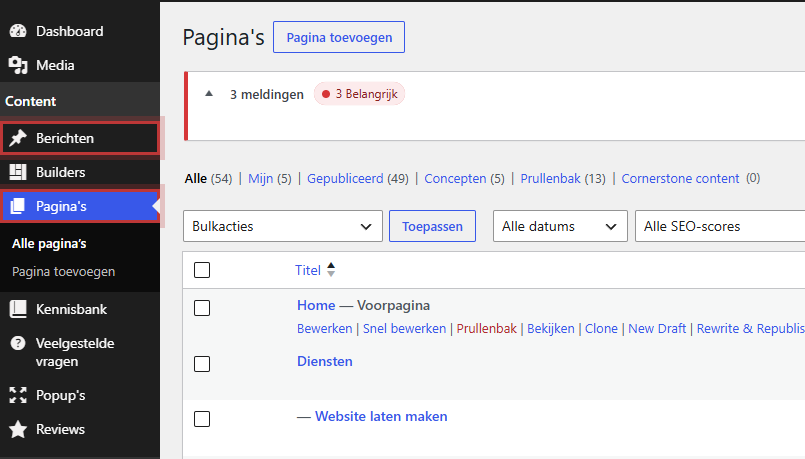
You can find pages in the menu on the left under Pages. Think of your homepage, a page for each service, About Us, and Contact. A page has no date and no category. You usually place it in the menu yourself. How to create one is explained in adding a new page.
Main and subpages
You can organize pages: a Web Design page under the parent page Services gets the address /services/web-design/. This keeps large sites organized. See creating a subpage.
Nog geen website op leflite?
Wij bouwen hem samen met jou. Daarna pas je alles zelf aan, precies zoals in dit artikel.
- Online binnen een week
- Hosting, SSL en back-ups inbegrepen
- Vanaf €49,95 per maand

A post: news and blogs
You can find posts under Posts. Each post gets a publication date. New posts automatically appear at the top of your overview, while older ones move down.
Date, category, and featured image
- Categories and Tags group your posts, for example, “News” and “Tips”.
- The Featured image appears with the post in overviews.
- The Summary is a short intro for overviews.
How to write and publish a post is explained in writing a blog post.
Automatically display posts with the Featured block
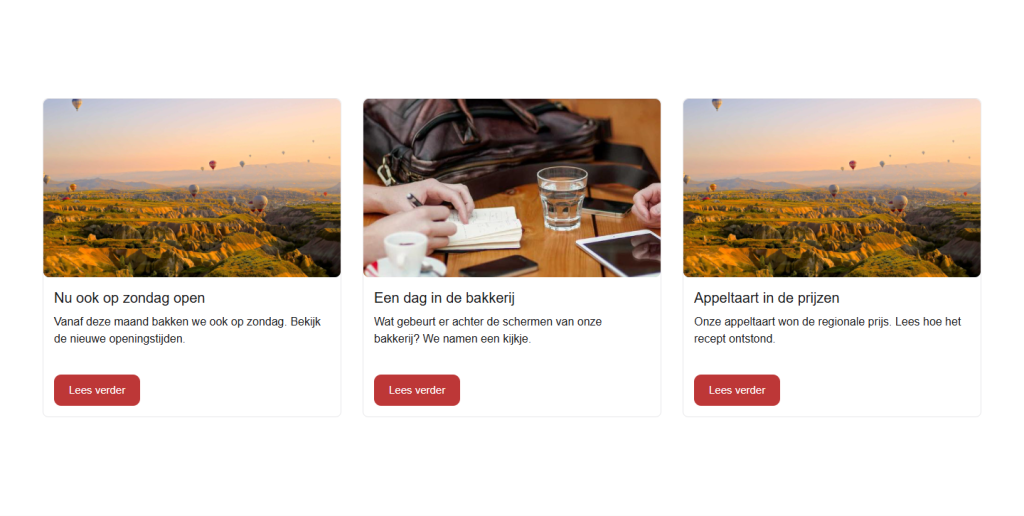
The great thing about posts: you don’t have to place them on a page yourself. Place the block Featured on your homepage, and choose Type of feature as By post type and Type as Post. With Number of items to display, you determine how many. When you write a new post, it will automatically appear there as a card with the featured image, the title, and a snippet of text. More in the Featured block.
Other types: frequently asked questions, reviews, and pop-ups
In addition to pages and posts, your website has its own types of content. You also create these separately and display them with a block:
- Frequently asked questions: one question with an answer per item.
- Reviews: customer ratings.
- Pop-ups: a window that appears over your page.
- Builders: sections that you reuse on multiple pages.
A single question or review is not created as a page, but under its own menu item.
Unsure?
- Do you want it to be in the menu and stay there for a long time? Page.
- Does it have a date that matters, or do you want it to automatically appear in a news overview? Post.
- Is it a landing page for a service or a location? Page.
- A vacancy, promotion, or event that can be removed later? Usually a post, unless your website has its own section for it.
Tip: did you create the wrong type? There is no button to convert a post to a page. Create a new page, copy the content, and then move the post to the trash. Also set up a redirect from the old address; see setting up a redirect.
Frequently asked questions
Not with one click. Create a new page, copy the content, and set up a redirect from the old address.
Share this article
Robert Oosterloo
Robert Oosterloo is eigenaar en UX/UI-designer van Lef Creative in Kollum. Hij ontwerpt websites, webshops en software voor ondernemers in Noord-Nederland.
Read also
Finding your way in the dashboard
This is how your leflite website is structured
Draft, preview, and previous versions






Want a website like this?
Here you can read how easy it is to maintain a leflite site yourself. Want one too? We will think along with you, no strings attached.
Prefer direct contact? Call Robert at 06 35 66 47 73 or send a WhatsApp.