
How do I link to a spot further down the page (anchor)?

Robert Oosterloo
Updated on · 3 min read
An anchor link jumps to a spot on a page, instead of to another page. Handy for a “View our prices” button at the top of a long page, or a menu that jumps to sections of your homepage. You do it in two steps: give the section a name, and link to it.
In short
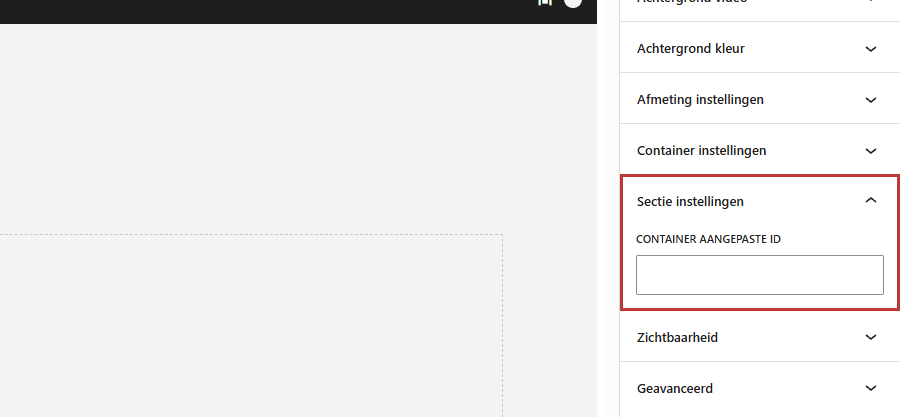
- Give the section an ID in Section settings → Container custom ID, for example services.
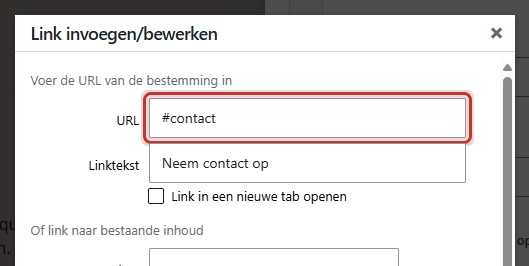
- Link to it with a hashtag: #services.
- From another page: /page/#services.
- An ID can only be used once per page.
Step 1: Give the section an ID
- Select the section where the link should jump to.
- Open the panel Section settings on the right.
- Type a short name in Container custom ID, for example services or prices.
- Save the page.
Which characters are allowed?
Only letters, numbers, the hyphen (-), and the underscore (_). Spaces and other characters will be automatically removed while typing. Use lowercase letters and a hyphen between words, such as our-services. Uppercase letters count: Services and services are different for the browser.
Step 2: Link to it with #id
A link to an anchor is the hashtag (#) followed by the ID.
From a button
Add a block Buttons, click on the link field at Button and type #services as the URL. Fill in a button text and save. How to create a button is explained in adding a button. In regular text, it works the same way: create a link with #services as the address (see adding a link).
From the menu (Custom link)
- Go to Menus in the left menu.
- Open Custom links on the left.
- Fill in the URL with the address of the page with the ID, for example /#services for the homepage, and a link text.
- Click on Add to menu and then on Save menu.
Use the full path in the menu (/#services instead of just #services). This way, the link will also work if the visitor is on another page. More in customizing the main menu.
From another page: /page/#id
Put the address of the page before the hashtag, for example /about-us/#team. The visitor goes to that page and jumps immediately to the section.
Tip: if your website has a fixed header that scrolls along, check that the title of the section does not disappear behind the menu after jumping. If it does, add a short space or a heading at the top of the section.
Nog geen website op leflite?
Wij bouwen hem samen met jou. Daarna pas je alles zelf aan, precies zoals in dit artikel.
- Online binnen een week
- Hosting, SSL en back-ups inbegrepen
- Vanaf €49,95 per maand

You also use the same ID for Section tabs
The block Section tabs displays tabs that each show a section on the page. For each tab, fill in the ID of a section at Linked section ID, exactly as you filled it in at Container custom ID. See tabs that show different sections.
Not working?
- The link does not jump: check if the ID is exactly the same, including uppercase letters, and if you haven’t forgotten the hashtag.
- The link jumps to the wrong place: the ID appears twice on the page, for example in a copied section. Give each section its own ID.
- It works on the homepage, but not from other pages: use the full path, such as /#services.
- The ID is in a pattern: a section from a synced pattern gets its ID from the Builder. Adjust the ID there.
Frequently asked questions
Check if the ID is exactly the same, without spaces, and appears only once on the page.
Share this article
Robert Oosterloo
Robert Oosterloo is eigenaar en UX/UI-designer van Lef Creative in Kollum. Hij ontwerpt websites, webshops en software voor ondernemers in Noord-Nederland.
Read also
More space between blocks
Tabs with Section tabs
Automatically display subpages as tiles






Want a website like this?
Here you can read how easy it is to maintain a leflite site yourself. Want one too? We will think along with you, no strings attached.
Prefer direct contact? Call Robert at 06 35 66 47 73 or send a WhatsApp.