
Why is my website (still) not in Google?

Robert Oosterloo
Updated on · 4 min read
Your new website is live, but if you search for it, you won’t find it. Usually, it’s a matter of patience: Google needs to discover your site first. Sometimes there’s a setting that prevents search engines from accessing it. In this article, you’ll learn how to check that and how to assist Google with Search Console.
In short
- A new site usually appears in Google within a few days to a few weeks.
- Check that Search engines are discouraged from indexing this site is turned off.
- Search in Google for
site:yourdomain.nlto see what is already indexed. - Link Google Search Console and submit your sitemap:
/sitemap_index.xml.
How long does it take?
Google needs to find, visit, and evaluate a new website first. For a new domain, this usually takes a few days to a few weeks. After that, you’re in, but not immediately at the top: a good position is built with quality content, links, and time. If you moved from an old to a new website on the same domain, it often goes faster.
Check 1: Can search engines see the site?
Settings → Reading
- Go to Settings → Reading.
- Look at Search engine visibility for the checkbox Discourage search engines from indexing this site.
- On your live website, this checkbox must be off. If it’s on, uncheck it and click Save Changes.
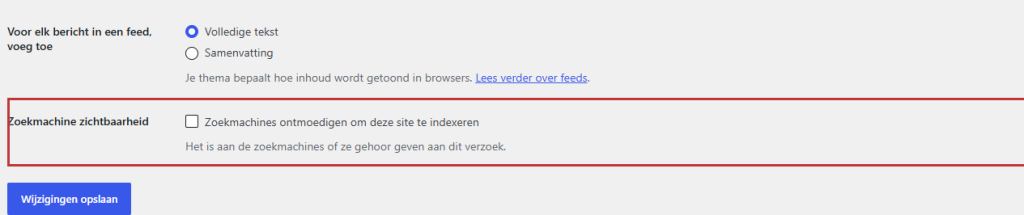
Test environments are always excluded from Google
If we are working on your site at a test address, your website automatically keeps itself out of Google, regardless of what the checkbox says. This does not apply to the live address. If you still don’t see your live site appearing, let us know, and we’ll check if everything is set up correctly.
Is there still a coming-soon page active? Then Google will only see that page. Turn it off when your site is ready; see a coming-soon page.
Nog geen website op leflite?
Wij bouwen hem samen met jou. Daarna pas je alles zelf aan, precies zoals in dit artikel.
- Online binnen een week
- Hosting, SSL en back-ups inbegrepen
- Vanaf €49,95 per maand

Check 2: search with site: in Google
Type in Google site:yourdomain.nl (with your own domain, no space after the colon). You will see all the pages of your site that Google knows about.
- No results: Google does not know your site yet. Continue with Search Console.
- Results, but you can’t find yourself under your business name or service: you’re in there, but not ranking yet. Read all about SEO.
- A page is missing: it might be set to noindex. Read keeping a page out of Google and check the setting.
Link Google Search Console
Google Search Console is free. You can see if Google can read your site, which pages are included, and what keywords you are found on. Go to search.google.com/search-console, log in with a Google account, and add your website. Google will then ask you to prove that the site belongs to you.
Verify via Yoast
- In Search Console, choose the method with the HTML tag and copy the code.
- Go to your website and navigate to Yoast SEO → Settings and open Site connections.
- Paste the code in the field for Google and save.
- Click on Verify in Search Console.
If this doesn’t work or you prefer us to do it? Ask us.
Submit your sitemap
Yoast automatically creates a sitemap: a list of all your pages for Google. It is located at yourdomain.nl/sitemap_index.xml.
- In Search Console, go to Sitemaps.
- Enter
sitemap_index.xmland click on Submit.
After a few days, you will see how many pages Google has found. You can also submit an individual page directly: paste the URL at the top in URL inspection and click on Request indexing.
Tip: Have other sites link to your new site: your Google business profile, your social media, industry associations, and suppliers. Every good link helps Google find your site faster.
Do you want us to take a look at why your site is not being found? Check out optimizing your website or webshop. More about Yoast settings: Setting up Yoast SEO.
Is it not working?
- site:yourdomain.nl shows nothing after weeks. Check the checkbox at Settings → Reading and whether the coming-soon page is turned off. Check in Search Console at URL inspection what Google says about your homepage.
- Verification in Search Console fails. Copy only the code between the quotes, or the entire tag, as Yoast asks in the field. Wait a moment after saving and try again.
- The sitemap shows an error. Open
yourdomain.nl/sitemap_index.xmlin your browser. If you see a list, then the sitemap is fine and usually resolves itself. If you see an error page, please contact us.
Can’t figure it out? Contact us, call 06 35 66 47 73 or email to info@lefcreative.nl.
Frequently Asked Questions
Usually a few days to a few weeks. Signing up in Google Search Console and links from other sites help.
No. Appearing in the regular search results is free. You only pay for advertisements.
Share this article
Robert Oosterloo
Robert Oosterloo is eigenaar en UX/UI-designer van Lef Creative in Kollum. Hij ontwerpt websites, webshops en software voor ondernemers in Noord-Nederland.
Read also
Using the Text block
Display a breadcrumb trail
Share buttons for social media






Want a website like this?
Here you can read how easy it is to maintain a leflite site yourself. Want one too? We will think along with you, no strings attached.
Prefer direct contact? Call Robert at 06 35 66 47 73 or send a WhatsApp.