
Everything about SEO in your leflite website

Robert Oosterloo
Updated on · 4 min read
Being found well on Google starts with your own website. leflite takes care of part of it for you, such as a quick setup, a sitemap, and clean code. The rest you do yourself, page by page: a good title and description, logical headings, links, and descriptive images. Here you see everything at a glance, with links to the articles that explain it.
In short
- Your website uses the plugin Yoast SEO for titles, descriptions, the sitemap, and the analysis.
- For each page, you fill in a SEO title and Meta description.
- Use one Heading 1 per page, followed by Heading 2 and 3.
- If you change a URL, make sure to set up a redirect.
- Link your website to Google Search Console to see how Google views your site.
What does leflite take care of?
- Yoast SEO is integrated into your website. It automatically creates a sitemap for Google (
/sitemap_index.xml) and provides fields and an analysis for each page. - leflite passes the text from its blocks to the Yoast analysis, so Yoast reads your entire page.
- The breadcrumb works together with Yoast; see show a breadcrumb.
- Frequently asked questions that you display with the FAQ block and reviews in cards receive structured data (schema), so Google understands them better.
- The first images at the top of a page load with priority, so the page appears quickly.
- A custom 404 page is automatically excluded from Google.
- Test and development environments are always excluded from Google, even if you set something different there.
Per page: title, description, and headings
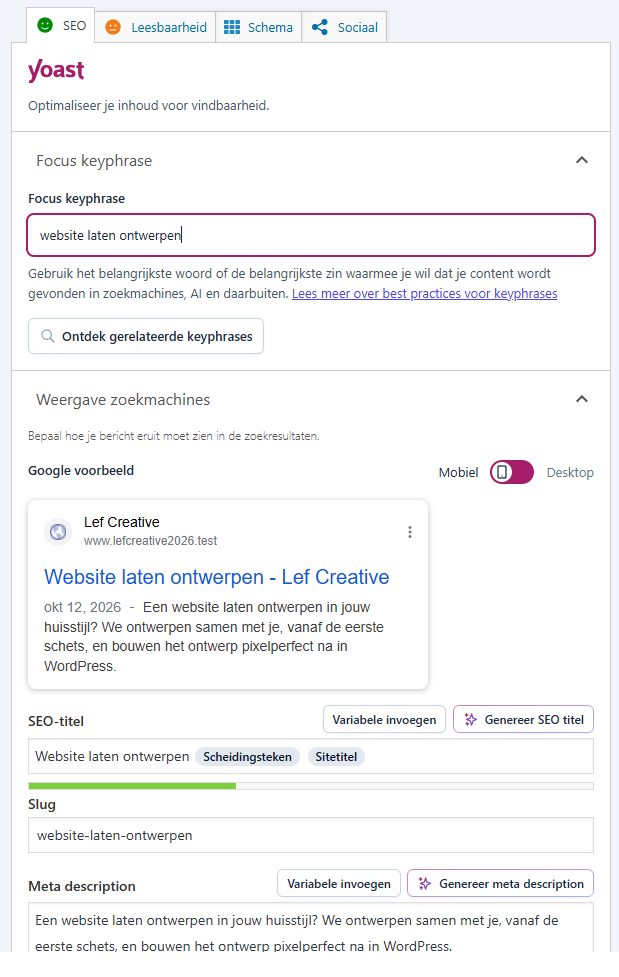
Under each page is the block from Yoast SEO. There you fill in the SEO title, the Slug, and the Meta description: the text that people see in Google. Read how to write a good page title and meta description. Also important: a logical structure with headings. Read how to use headings effectively. The basics of Yoast are in setting up Yoast SEO.
Nog geen website op leflite?
Wij bouwen hem samen met jou. Daarna pas je alles zelf aan, precies zoals in dit artikel.
- Online binnen een week
- Hosting, SSL en back-ups inbegrepen
- Vanaf €49,95 per maand

Content: links, images, and questions
- Links: link from your texts to your other pages, with a descriptive link text. Read how to add a link.
- Images: give each image an alt text that describes what it shows. Read how to fill in a good alt text.
- Frequently asked questions: answer the questions that customers really ask. Read how to display frequently asked questions.
- The focus keyword: Yoast helps you check if your page is about one clear topic. Read how to use the Yoast analysis.
Technique: URLs, redirects, and noindex
- If you change the URL of a page or remove it, you want to redirect visitors and Google. Read how to set up a redirect.
- Some pages should not be in Google, such as a thank you page. Read how to keep a page out of Google.
- Is your new site not yet in Google? Read why your website is not yet in Google.
Measuring: Google Search Console
Google Search Console is a free service from Google. You can see which keywords you are found for, how many people click, and if Google finds any issues. You also submit your sitemap there. How to link it is explained in getting your website in Google.
Tip: SEO is not a trick but maintenance. Check your most important pages a few times a year: is the text still correct, is the title still good, do all links work? That yields more than adjusting the Yoast balls every day.
Prefer us to do it?
Do you want us to take a look, or improve your website for Google and speed? Check out optimizing your website or webshop, or get in touch.
All articles about SEO
- How do I write a good page title and meta description?
- How do I use the Yoast analysis and the focus keyword?
- How do I use headings (H1, H2, H3) correctly?
- How do I add a link to another page?
- How do I set up a redirect when a URL changes?
- How do I remove a page from Google (noindex)?
- Why is my website (still) not in Google?
- Setting up Yoast SEO: here’s how
Share this article
Robert Oosterloo
Robert Oosterloo is eigenaar en UX/UI-designer van Lef Creative in Kollum. Hij ontwerpt websites, webshops en software voor ondernemers in Noord-Nederland.
Read also
Using the Text block
Display a breadcrumb trail
Share buttons for social media






Want a website like this?
Here you can read how easy it is to maintain a leflite site yourself. Want one too? We will think along with you, no strings attached.
Prefer direct contact? Call Robert at 06 35 66 47 73 or send a WhatsApp.