
How do I use the Yoast analysis and the focus keyword?

Robert Oosterloo
Updated on · 4 min read
Under each page, Yoast SEO provides red, orange, and green dots. They help you write a page that focuses on one clear topic and reads well. But they are a tool, not a goal. In this article, you will read what the analysis does, how to choose a focus keyword, and which advice you can better ignore.
In short
- Fill in the Focus keyphrase with the keyword that the page should be found on.
- The SEO analysis shows Problems, Improvements, and Good results.
- The Readability analysis looks at sentence length, paragraphs, and subheadings.
- Green is not a goal: write for your visitor.
What does the analysis do?
Yoast reads your page while you write and provides two assessments:
- SEO: does the page match the keyword you choose? Is it in the title, introduction, slug, description, and a subheading?
- Readability: is your text easy to read? Not too long sentences, enough subheadings, not too much passive voice.
Each assessment has a dot: red, orange, or green. You can see them at the top of the editor and in the list of pages.
Step 1: Choose a focus keyword
A focus keyword (called Focus keyphrase in Yoast) is the search term you want to be found with on this page. Here’s how to choose it:
- One topic per page. If you want to be found on two things, create two pages.
- The words of your customer, not your jargon. Someone searches for “bike repair”, not “bicycle maintenance”.
- Preferably specific: “accountant Leeuwarden” is more achievable than “accountant”.
- Each page has its own keyword. Two pages with the same keyword compete with each other.
Fill in the keyword at Focus keyphrase in the Yoast block below the page. The analysis refreshes immediately.
Nog geen website op leflite?
Wij bouwen hem samen met jou. Daarna pas je alles zelf aan, precies zoals in dit artikel.
- Online binnen een week
- Hosting, SSL en back-ups inbegrepen
- Vanaf €49,95 per maand

Step 2: Review the SEO analysis
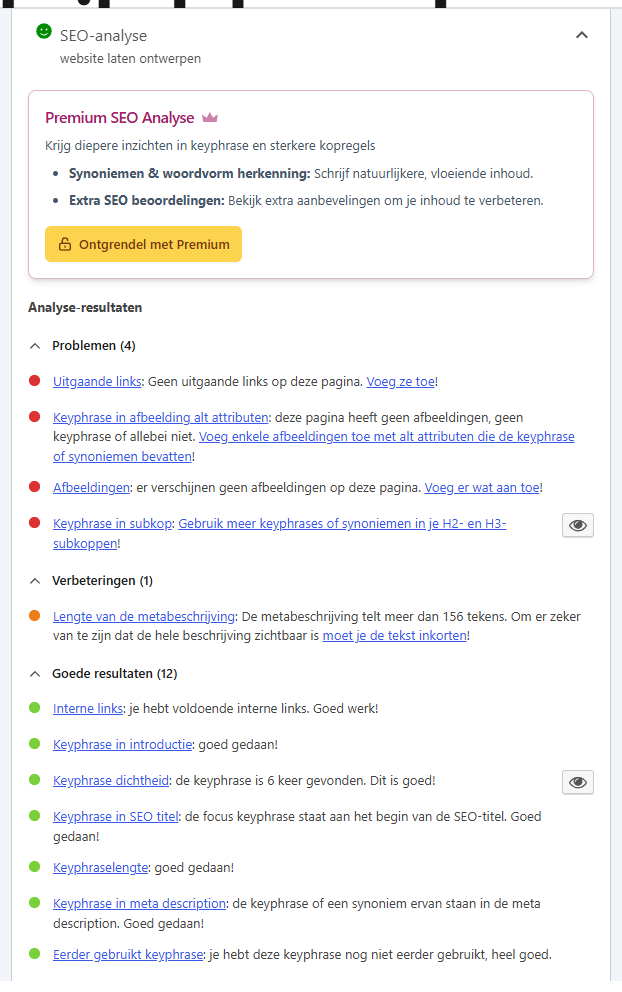
Click on SEO analysis. The points are grouped: Problems (red), Improvements (orange), and Good results (green). These are the points that matter most:
- Keyphrase in SEO title: include the keyword in the title, preferably at the beginning. See how to write a good page title.
- Keyphrase in introduction: mention the topic in your first paragraph.
- Keyphrase in slug: the keyword in the URL. Only change the slug of an existing page with a redirect.
- Keyphrase in subheadings: use the topic in one or more subheadings. See how to use headings well.
- Keyphrase in image alt attributes: if applicable, in the alt text of an image.
- Internal and outgoing links: link to your other pages and where useful to other sites.
Step 3: Check the readability
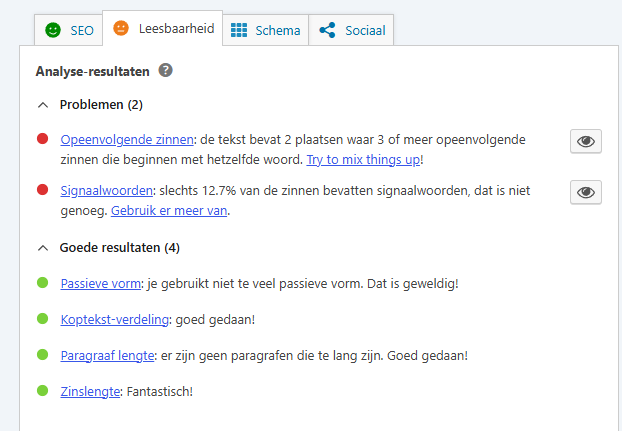
Click on Readability analysis. Yoast pays attention to long sentences, long paragraphs, too few subheadings, passive voice, and sentences that start with the same word. Those tips are usually good: short sentences and clear headings read more pleasantly, especially on a phone.
Does Yoast read everything in your leflite blocks?
leflite passes the text from its blocks to Yoast, so the analysis takes your entire page into account: texts, buttons, lists, and accordions. However, Yoast may see a detail differently than you do, for example, with text in a slider or a pattern that appears on multiple pages. If Yoast says something is missing while it is there? Then check the page itself and trust what you see.
Green is not a goal
The dots are a checklist, not a score from Google. Google does not know Yoast and does not count green dots. A few tips:
- Do not awkwardly force the keyword everywhere. A text that reads unnaturally scores worse with visitors AND with Google.
- Orange on a short page, like contact? That’s fine. Not every page needs to have 300 words.
- A heading is a heading because the text below it is about that topic, not to please Yoast.
Good to know: Yoast also checks if you have already used the focus keyword on another page. If you receive that notification, choose a more specific keyword or merge the pages. You can read more about the rest of Yoast in setting up Yoast SEO. Everything about findability: all about SEO.
Not working?
- You see no analysis. First fill in a Focus keyphrase. Without a keyword, Yoast cannot perform the SEO analysis.
- Yoast says the text is too short, but there is a lot on the page. Save the page and reopen it. If it remains the same, then the text is likely in a section that Yoast does not count, such as a pattern.
- The dot will not turn green, no matter how you write. Check which points are still red and whether they are meaningful for this page. If your text is good for your visitor, then orange is fine.
Can’t figure it out? Contact us, call 06 35 66 47 73 or email info@lefcreative.nl.
Share this article
Robert Oosterloo
Robert Oosterloo is eigenaar en UX/UI-designer van Lef Creative in Kollum. Hij ontwerpt websites, webshops en software voor ondernemers in Noord-Nederland.
Read also
Using the Text block
Display a breadcrumb trail
Share buttons for social media






Want a website like this?
Here you can read how easy it is to maintain a leflite site yourself. Want one too? We will think along with you, no strings attached.
Prefer direct contact? Call Robert at 06 35 66 47 73 or send a WhatsApp.