
How do I write a good page title and meta description?

Robert Oosterloo
Updated on · 5 min read
In Google, someone sees two things from your page first: the title and a short description. These determine whether they click. With Yoast SEO, you can fill them in yourself for each page. In this article, you will read where, how long they can be, and how to write them so that people actually click.
In short
- You fill in the SEO title and Meta description at the bottom of the page, in the Yoast SEO block.
- Title: about 50 to 60 characters, with the most important word at the front.
- Description: about 120 to 155 characters, with a reason to click.
- On the Social tab, you determine how the page looks when it is shared.
Step 1: Open the Yoast block
- Open the page in the editor.
- Scroll down to the Yoast SEO block.
- In the Google preview, you can see how the page appears in Google. Choose Mobile result or Desktop result.
- Below are the fields SEO title, Slug, and Meta description, each with a colored bar indicating whether the length is correct.
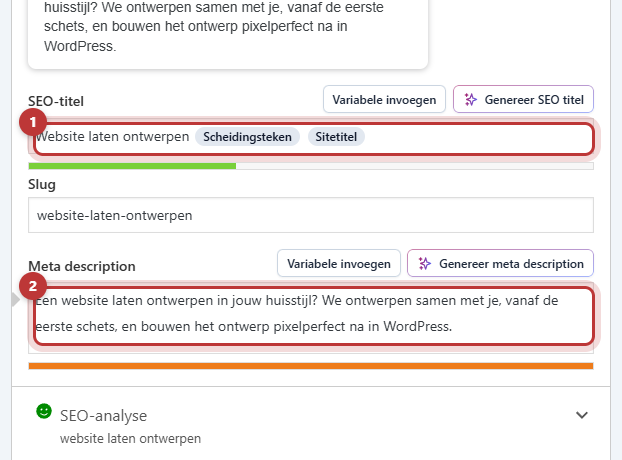
Step 2: Write a good SEO title
By default, Yoast creates the title from the page name and your website name. Often, it can be improved. A good SEO title:
- is about 50 to 60 characters. Longer titles get cut off in Google.
- starts with what the page is about, in the words your customer uses.
- is unique: no two pages should have the same title.
- may end with your company name. Yoast adds it with a variable at the end; you will see it in the field as a block.
Nog geen website op leflite?
Wij bouwen hem samen met jou. Daarna pas je alles zelf aan, precies zoals in dit artikel.
- Online binnen een week
- Hosting, SSL en back-ups inbegrepen
- Vanaf €49,95 per maand

Step 3: Write a good meta description
The description appears in Google under the title. It does not count towards your position, but it does affect the number of clicks. A good description:
- is about 120 to 155 characters;
- states in plain language what the visitor will find on the page;
- contains the word you want to be found for (Google makes it bold if it matches the search query);
- ends with a reason to click: a benefit, an answer, an action.
Examples: weak and strong
For the page of a bicycle repair shop about repairs:
- Weak title: “Services – Bike House”. Says nothing about repairs, and “Services” is not searched for.
- Strong title: “Get your bike repaired in Dokkum | Bike House”.
- Weak description: “Welcome to our website. We are a bike shop with a lot of experience.”
- Strong description: “Flat tire or squeaky brakes? Bring your bike in and you usually get it back the same day. Also e-bikes. Check our rates.”
The slug (URL)
The field Slug is the last part of the URL, such as bike-repair. Short, in lowercase letters, with dashes. Preferably do not change the slug if the page has existed for a while: the old URL will no longer work. If you must, read first how to change a page’s URL and set up a redirect.
What does your page look like when it is shared?
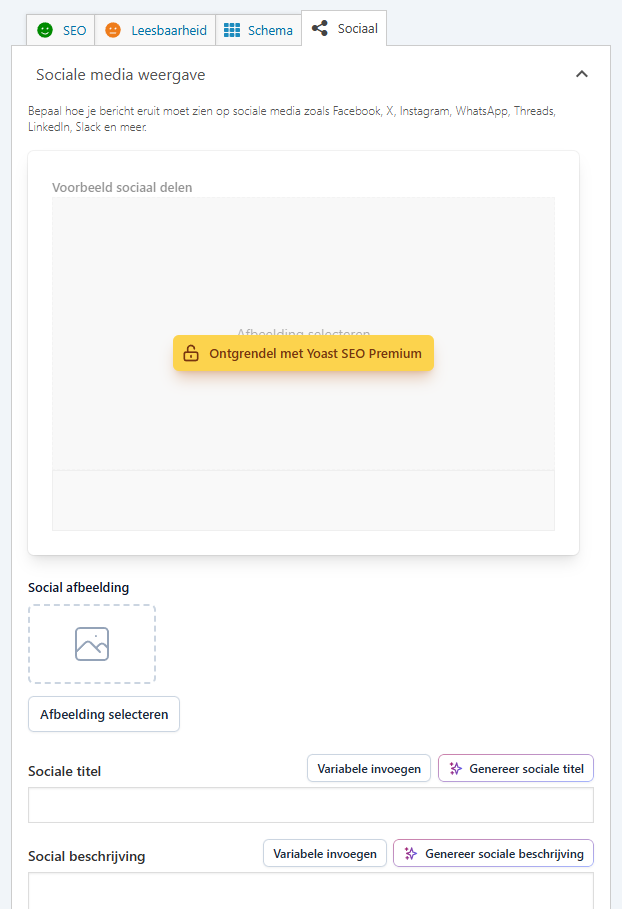
If someone shares your page on Facebook, LinkedIn, or WhatsApp, an image, a title, and a description will appear. You set these in the Social tab of Yoast, under Social display:
- Social image: choose an image of 1200 by 630 pixels. Without your own choice, Yoast will use the featured image or the first image.
- A custom title and description for social media. If you leave them empty, Yoast will use the SEO title and meta description.
You can add share buttons on your page itself with the Share block; see how to let visitors share a page.
Prices and phone numbers in the description
Preferably do not include prices, opening hours, or phone numbers in your SEO title or meta description. If they change, you will have to adjust each description separately, and Google sometimes shows the old text for weeks. Write “Check our rates” instead of a specific amount.
Tip: Start with your most important pages: the homepage, your service pages, and the pages where you make money. A better title and description will yield the most results there. You can read about the other settings of Yoast in setting up Yoast SEO; use the focus keyword in the Yoast analysis.
Having trouble?
- Google is still showing the old title. Google needs to revisit your page first. This can take days to weeks. You can speed it up via Google Search Console with URL inspection and requesting indexing.
- You do not see the Yoast block. Scroll all the way down in the editor. Or click the Yoast icon in the top right to open it in the sidebar.
- The bar remains orange or red. The text is too short or too long. A guideline, not a rule: better to have a good sentence of 160 characters than a bad one of 150.
- A wrong image appears when sharing. Set a Social image. Facebook and LinkedIn sometimes remember an old image for a while.
Can’t figure it out? Contact us, call 06 35 66 47 73 or email info@lefcreative.nl.
Frequently asked questions
Google sometimes chooses a piece of text from your page itself if it fits better with the search query according to Google. A clear, relevant description increases the chances that it will use yours.
Share this article
Robert Oosterloo
Robert Oosterloo is eigenaar en UX/UI-designer van Lef Creative in Kollum. Hij ontwerpt websites, webshops en software voor ondernemers in Noord-Nederland.
Read also
Using the Text block
Display a breadcrumb trail
Share buttons for social media






Want a website like this?
Here you can read how easy it is to maintain a leflite site yourself. Want one too? We will think along with you, no strings attached.
Prefer direct contact? Call Robert at 06 35 66 47 73 or send a WhatsApp.