
How do I display a form in a pop-up?

Robert Oosterloo
Updated on · 4 min read
A button “Request a quote” that opens a form in a window: the visitor stays on the page and fills out the form immediately. First, you create a pop-up, place the form in it, and link the button to it.
In short
- Create a pop-up via Pop-ups → Add new pop-up.
- Place the form in it with a shortcode using
ajax=true. - Publish the pop-up and note the link from the column Pop-up link.
- Put that link (
#lef-popup-plus the ID) in the link field of a button. - A link in the menu does not open the pop-up: use a button or text link on the page.
What do you need?
- A form in Gravity Forms and its ID. See placing a form on a page.
- A page with a button or text link that should open the pop-up.
Nog geen website op leflite?
Wij bouwen hem samen met jou. Daarna pas je alles zelf aan, precies zoals in dit artikel.
- Online binnen een week
- Hosting, SSL en back-ups inbegrepen
- Vanaf €49,95 per maand

Step 1: Create a pop-up
Go to Pop-ups → Add new pop-up in the left menu. Give the pop-up a title that you recognize, for example, “Request a quote”. The visitor does not see this title.
You build a pop-up just like a page: with a section, a column, and blocks. You can read how pop-ups generally work in creating a pop-up.
Step 2: Place the form in it
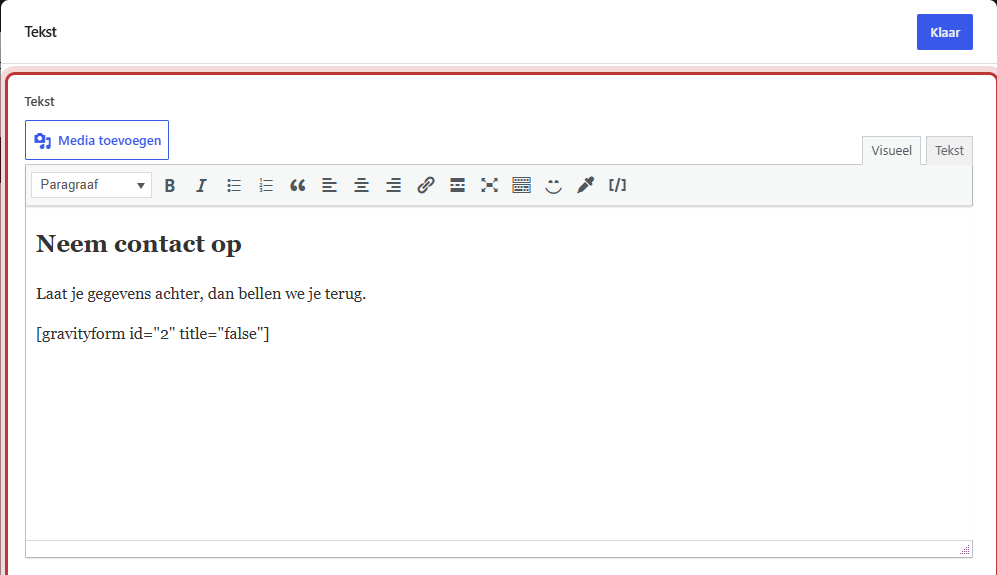
Add a Text block in the column. At the top, place a short heading, for example, “Request a quote”, and below that the shortcode:
[gravityform id=1 title=false description=false ajax=true]
Replace the 1 with the ID of your form. Keep ajax=true: this way, the form will be submitted without reloading the page, and the thank you message will remain neatly in the pop-up. Without ajax, the page reloads and the pop-up disappears.
Step 3: Publish and find the ID of the pop-up
Click on Publish. A pop-up that is still a draft will not open.
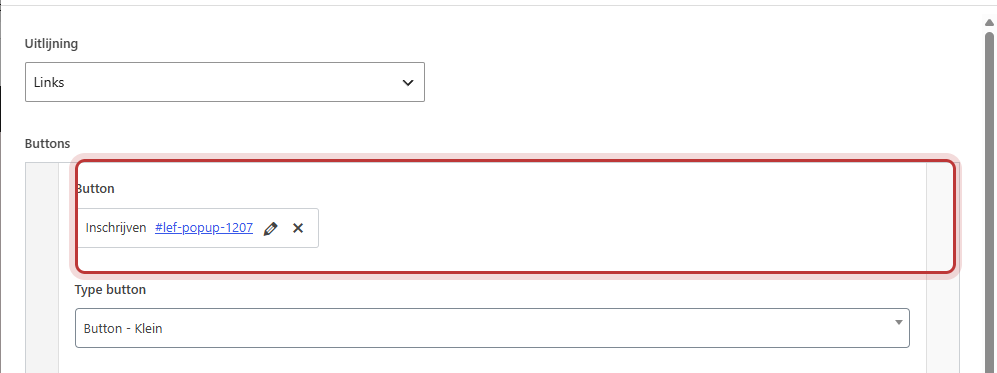
Above the editor of a pop-up, there is a message indicating exactly what you need to fill in the button: “To open this pop-up, enter the following in the URL field of the respective button or link:” followed by the link. You can find the same link in the overview Pop-ups, in the column Pop-up link. The link consists of #lef-popup- followed by the number (ID) of the pop-up.
Step 4: Link a button to the pop-up
Open the page where the button should be. Add a Buttons block (see adding a button) or choose an existing button. Paste the link from step 3 into the link field of the button, so #lef-popup- with the ID of your pop-up. Give the button a clear text, such as “Request a quote”.
A regular text link in a Text block also works: select the text, click on the link button, and paste the same link.
Testing
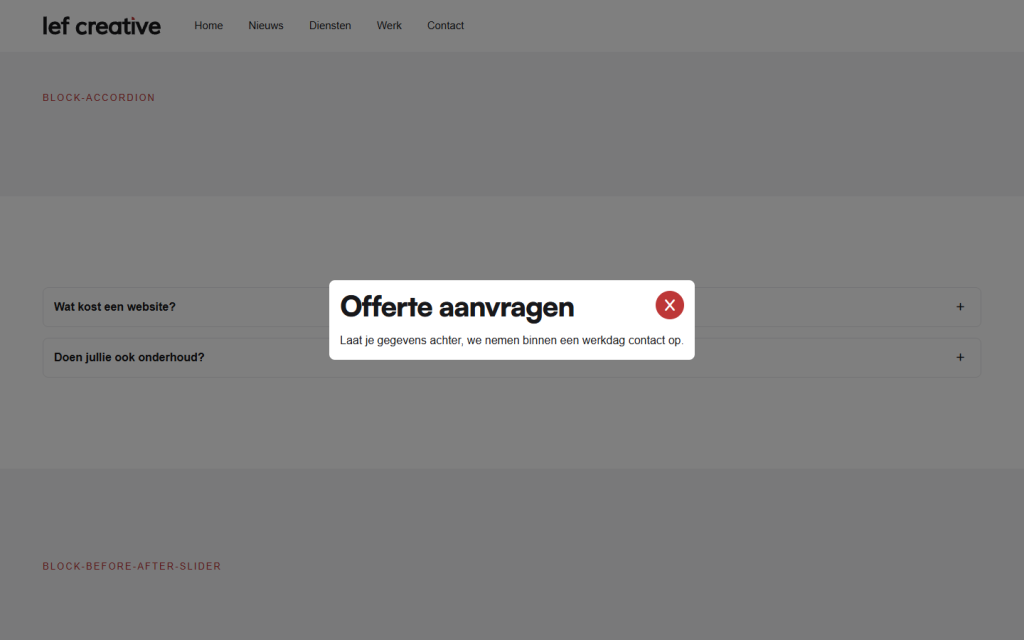
Save the page and view it on the website. Click on the button: the pop-up opens with the form. Fill out the form once. You will see the thank you message in the pop-up, and the notification will arrive at the address you have set (see who receives the form messages).
Does not work from the menu
The theme searches for buttons and links with #lef-popup- in the content of that page when loading, and only prepares those pop-ups. A link in the menu is not found in this process. A link in the top bar or in a footer widget may also not work. Therefore, place the button in the content of the page. Do you want the button on every page? Then place it in a section that appears on every page, see a section on every page above the footer.
Not working?
- Nothing happens when you click the button. Check the link:
#lef-popup-plus the correct ID, without spaces and without a web address in front. And is the pop-up published? - The page reloads after submission and the pop-up is gone. Make sure
ajax=trueis in the shortcode. - The button is in the menu and does not work. That cannot be done from the menu. Use a button or text link on the page.
- The pop-up opens, but is empty. Check if the form ID in the shortcode is correct and if the form is active.
Can’t figure it out? Contact us or call 06 35 66 47 73. We are happy to help you out.
Frequently Asked Questions
No, a link in the menu does not load the pop-up. Use a button or text link on the page.
Share this article
Robert Oosterloo
Robert Oosterloo is eigenaar en UX/UI-designer van Lef Creative in Kollum. Hij ontwerpt websites, webshops en software voor ondernemers in Noord-Nederland.
Read also
How do I set who receives the form messages?
How do I ensure that the email from my website arrives?
I’m not receiving messages from my form: what now?






Want a website like this?
Here you can read how easy it is to maintain a leflite site yourself. Want one too? We will think along with you, no strings attached.
Prefer direct contact? Call Robert at 06 35 66 47 73 or send a WhatsApp.