
A pop-up is a window that opens over your page when a visitor clicks on a button or link. Useful for extra explanations, a video, an action, or a form, without the visitor leaving the page.
In short
- Create a pop-up via Pop-ups → Add new pop-up.
- Fill it with regular sections and blocks, and publish it.
- The link to open it is above the editor and in the column Pop-up link.
- Place that link in a button or text link on the page.
- A pop-up only opens after a click, not automatically and not from the menu.
Nog geen website op leflite?
Wij bouwen hem samen met jou. Daarna pas je alles zelf aan, precies zoals in dit artikel.
- Online binnen een week
- Hosting, SSL en back-ups inbegrepen
- Vanaf €49,95 per maand

How do pop-ups work in leflite?
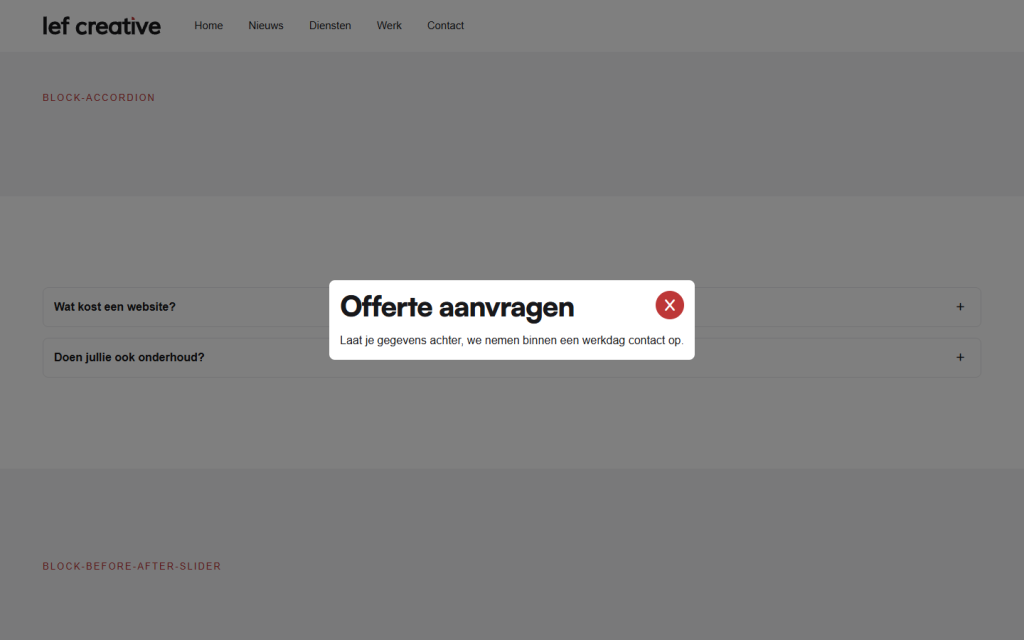
A pop-up is a separate piece of content under Pop-ups in the menu. It does not have its own page. On a page, you place a button or link with the address of the pop-up. When a visitor clicks on it, the pop-up opens over the page. It can be closed with the red cross in the top right corner.
Step 1: Create a new pop-up
Go to Pop-ups → Add new pop-up in the left menu. Give the pop-up a title that you recognize, for example, “Autumn Action”. The visitor will not see that title.
Step 2: Fill in the content
You build a pop-up just like a page: add a section with a column, and place blocks in it such as Text, Image, Video, or Buttons. See adding a section if you haven’t done that before.
Tip: keep a pop-up short: a headline, a few sentences, and at most one button or form. Long content fits better on its own page.
Step 3: Publish and note the link
Click on Publish. A draft pop-up does not open.
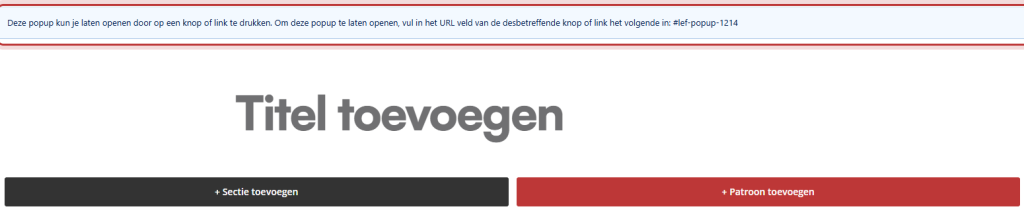
Above the editor, there is a message: “This pop-up can be opened by clicking on a button or link. To open this pop-up, enter the following in the URL field of the respective button or link:” followed by the link. That link consists of #lef-popup- and the number (ID) of the pop-up. You can also find it in the overview Pop-ups, in the column Pop-up link.

Step 4: Link to the pop-up
From a button
Open the page where the pop-up should open. Add a Buttons block or choose an existing button, and paste the link of the pop-up in the link field. See adding a button.
From a text link
In a Text block, select the word or phrase, click on the link button, and paste the same link. See adding a link.
Save the page and test it on the website: click on the button and the pop-up opens.
What cannot be done
From the menu, the top bar, or the footer
The theme checks which pop-up links are in the content of that page when loading, and only prepares those pop-ups. A link in the menu is not found, and a link in the top bar or a footer widget does not always work. So place the button in the content of the page.
Automatically opening
A pop-up only opens after a click. There is no setting to open it after a few seconds or when leaving the page. This is also more pleasant: pop-ups that open automatically annoy visitors, and Google does not like them on a phone.
Good to know: do you want a form in the pop-up? That is possible, with a small additional setting. See showing a form in a pop-up.
Having trouble?
- Nothing happens when you click. Check if the link is exactly correct:
#lef-popup-plus the ID, without space and without a web address in front. And is the pop-up published? - The link is in the menu. That does not work. Use a button or text link on the page.
- The pop-up shows “No content found for this pop-up.” The number belongs to something other than a pop-up. Copy the link again from the Pop-up link column.
Still can’t figure it out? Contact us or call 06 35 66 47 73. We are happy to help.
Frequently asked questions
No, only after a click on a button or link. This keeps it friendly for visitors and for Google.
Share this article

Robert Oosterloo
Robert Oosterloo is eigenaar en UX/UI-designer van Lef Creative in Kollum. Hij ontwerpt websites, webshops en software voor ondernemers in Noord-Nederland.
Read also
Automatically display posts or pages
Placing a quote
Display categories as buttons or cards






Want a website like this?
Here you can read how easy it is to maintain a leflite site yourself. Want one too? We will think along with you, no strings attached.
Prefer direct contact? Call Robert at 06 35 66 47 73 or send a WhatsApp.