
How do I embed a video from YouTube or Vimeo?

Robert Oosterloo
Updated on · 4 min read
A video from YouTube or Vimeo can be added to your page using the Video block. You just paste the link. Your website takes care of the rest: the video will have the correct aspect ratio and will only load when your visitor clicks play.
In short
- Copy the link of the video on YouTube or Vimeo.
- Add the Video block in a column and paste the link in Video.
- The player only loads after clicking play. This is faster and better for privacy.
- YouTube videos run through youtube-nocookie.com.
- A video that plays automatically and silently can be set as the background of a section.
Nog geen website op leflite?
Wij bouwen hem samen met jou. Daarna pas je alles zelf aan, precies zoals in dit artikel.
- Online binnen een week
- Hosting, SSL en back-ups inbegrepen
- Vanaf €49,95 per maand

Step 1: Copy the link of the video
Open the video on YouTube or Vimeo. Click on Share below the video and copy the link, or copy the address from your browser’s address bar. For example https://www.youtube.com/watch?v=… or https://vimeo.com/….
Step 2: Add the Video block
Click on the plus sign in a column, search for video, and choose the Video block.
Step 3: Paste the link
Paste the link in the Video field in the block settings. WordPress will fetch the video immediately. Then click Save to save the page.
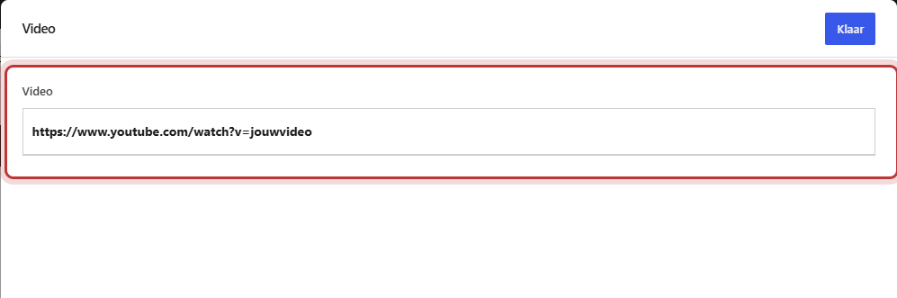
What do you see in the editor?
In the editor, you won’t see a real player, but the thumbnail of the video with a play button and the title. This is intentional: otherwise, YouTube would show an error message in the editor. View the page via Preview to actually play the video.
What does your visitor see?
Your visitor sees the same thumbnail with a play button, always in the 16:9 aspect ratio across the width of the column. Only after clicking play does the YouTube or Vimeo player load and the video starts. This makes your page load faster: a YouTube player can quickly add up to a megabyte of code.

Privacy: youtube-nocookie
Your website automatically converts YouTube videos to youtube-nocookie.com, the privacy-friendly version of YouTube. Additionally, nothing is sent to YouTube or Vimeo as long as the visitor does not click play. The thumbnail is also loaded from your own website. If you have a cookie notice with a cookie blocker on your website, it can handle the video itself with its own notification.
What can’t the block do?
The block has no settings for a custom thumbnail, autoplay, or mute. Do you want a video that plays automatically and silently? Then use a background video, see below.
Upload your own video (mp4)?
The Video block is designed for YouTube and Vimeo. Preferably upload your own videos there and place the link. A video file on your own website is large, takes up storage space, and slows down your website. YouTube and Vimeo adjust the quality based on your visitor’s connection.
Video as background
A video that plays silently and without buttons behind a section is set in the section under Background video, not with the Video block. There you can also choose Do not load video on mobile. Read how to set a video as background.
Do you want a video between photos in a carousel? That can be done with the image slider.
Is it not working?
- I only see a blank space. Check if the link is correct and if the video is public or unlisted. A private video cannot be embedded.
- The video does not play in the editor. That’s correct: the editor only shows the thumbnail. View the page via Preview.
- The video should start automatically. That is not possible with the Video block. Use a background video.
- The owner has disabled embedding. Some videos are not allowed to be on other websites. Choose another video or link to it with a button.
- My page is slow. A regular video in the block only loads after a click. Is it something else? Read why your website is slow.
More about images can be found in everything about images and video. Can’t figure it out? Contact us.
Frequently Asked Questions
Not in the Video block. A video that starts automatically without sound can be set as the background of a section.
Share this article
Robert Oosterloo
Robert Oosterloo is eigenaar en UX/UI-designer van Lef Creative in Kollum. Hij ontwerpt websites, webshops en software voor ondernemers in Noord-Nederland.
Read also
Setting up a slider
A video as a background
A photo as the background of a section






Want a website like this?
Here you can read how easy it is to maintain a leflite site yourself. Want one too? We will think along with you, no strings attached.
Prefer direct contact? Call Robert at 06 35 66 47 73 or send a WhatsApp.