
Which plugins are included by default in my website?

Robert Oosterloo
Updated on · 4 min read
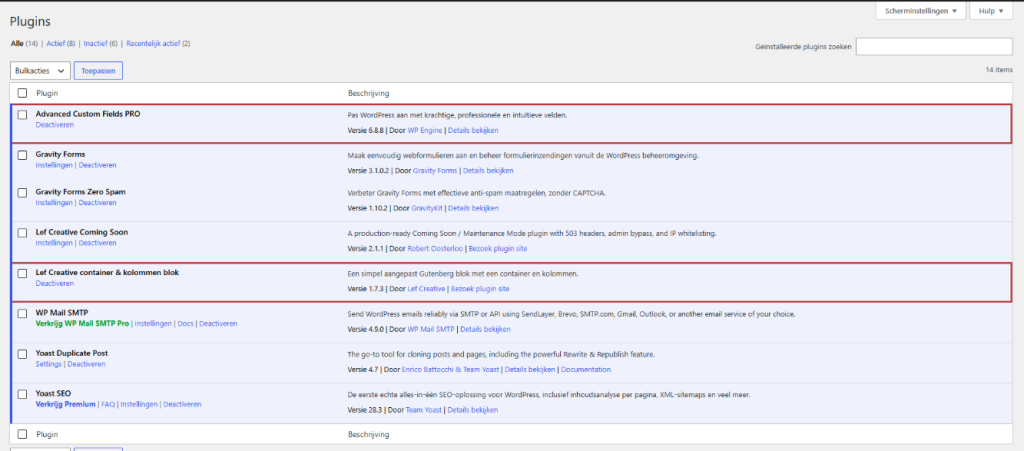
A plugin adds a function to WordPress. Your leflite website intentionally has only a handful: most is already included in the theme. Here you can read which plugins are included by default in your website, what they do, and which ones you should never disable.
In short
- Advanced Custom Fields PRO and Lef Creative container & columns block keep your editor functioning: never disable.
- Gravity Forms with Gravity Forms Zero Spam manage your forms.
- Yoast SEO manages your visibility on Google, WP Mail SMTP ensures your emails are delivered.
- Want to add or remove a plugin? Consult with us first.
Why so few plugins?
Each plugin is extra code that needs to load, must be updated, and can contain security vulnerabilities. That’s why leflite itself already includes much of what you would otherwise do with plugins: sections, sliders, galleries, FAQs, reviews, pop-ups, opening hours, and a search function. This keeps your site fast and secure. How to keep your site secure is explained in keeping your website safe and up-to-date.
The plugins that keep your website functioning (never disable)
Advanced Custom Fields PRO
All blocks of your website, such as Text, Buttons, and Highlighting, and all General options are built with Advanced Custom Fields (ACF). If you disable this plugin, no block will work, and your site will fall apart.
Lef Creative container & columns block
Our own builder. It provides the sections, columns, rows, and patterns in the editor. Without this plugin, you cannot layout your pages, and your site will look different.
Nog geen website op leflite?
Wij bouwen hem samen met jou. Daarna pas je alles zelf aan, precies zoals in dit artikel.
- Online binnen een week
- Hosting, SSL en back-ups inbegrepen
- Vanaf €49,95 per maand

Forms: Gravity Forms + Zero Spam
Gravity Forms creates your contact forms and other forms. You can find them under Forms in the menu, with all submissions. Gravity Forms Zero Spam automatically blocks spam without requiring visitors to solve puzzles. More in everything about forms.
Visibility: Yoast SEO
Yoast SEO allows you to set the title and description for Google per page, creates a sitemap, and helps with your texts. See setting up Yoast SEO.
Email: WP Mail SMTP
Your website sends emails: form messages, password recovery, orders. WP Mail SMTP ensures that those emails are sent via a real mail server, so they arrive and do not end up in spam. We have set up the configurations for you. See ensuring your website’s emails arrive.
Convenient: Yoast Duplicate Post
With this, you can copy a page or post in one click, or rewrite a live page into a copy. See copying a page.
During construction: Lef Creative Coming Soon
As long as your website is not ready, this plugin shows visitors a ‘coming soon’ page while you and we are working on it. After the launch, it will be disabled. See enabling a coming soon page.
Plugins that are always enabled
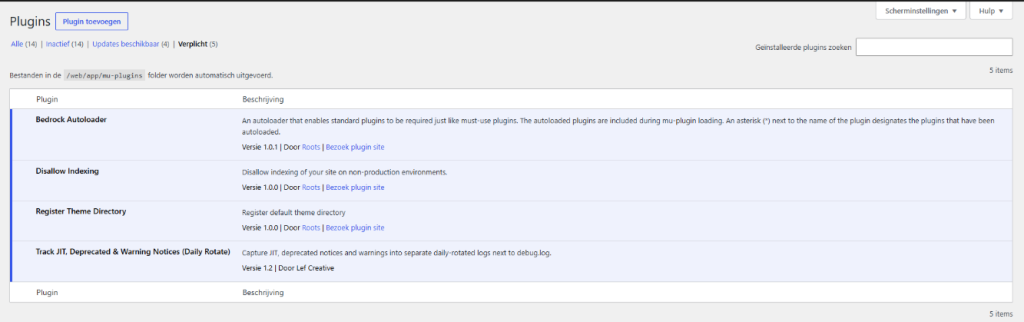
In the plugin overview, there is also a tab Must-use. These plugins are always enabled and cannot be disabled. They are part of the technical structure of your website. An example is Disallow Indexing: it ensures that a test version of your website does not appear on Google. It does nothing on your live website.
Plugins that only some websites have
If you have a webshop, it also includes WooCommerce, sometimes with a filter plugin from us for the shop page. These are only active if your website needs them.
Want to add or remove a plugin?
By default, you cannot install or update plugins on your leflite website: this is disabled for security reasons. The menu Plugins is also hidden. Do you need a function that is not yet available? Ask us. Often it can already be done with a block or module in the theme, and otherwise, we will find a plugin that is safe and works well with leflite. See also adding a new plugin to your website.
Note: never disable Advanced Custom Fields PRO or Lef Creative container & columns block, not even for testing. Your pages will then show errors or empty spaces.
Unsure?
Do you see a plugin you don’t recognize, or a message about a plugin? Let us know via contact. With a maintenance contract, we keep all plugins updated for you and check if everything still works after an update; see WordPress maintenance.
Frequently asked questions
Never disable ACF PRO and the Lef builder. If you have doubts about another, ask us.
Share this article
Robert Oosterloo
Robert Oosterloo is eigenaar en UX/UI-designer van Lef Creative in Kollum. Hij ontwerpt websites, webshops en software voor ondernemers in Noord-Nederland.
Read also
Copying a page
Turning on a coming soon page
How do I add a new plugin to my website?






Want a website like this?
Here you can read how easy it is to maintain a leflite site yourself. Want one too? We will think along with you, no strings attached.
Prefer direct contact? Call Robert at 06 35 66 47 73 or send a WhatsApp.