
How do I hide other shipping methods with free shipping?

Robert Oosterloo
Updated on · 4 min read
WooCommerce only shows free shipping once the customer reaches the threshold amount. However, the paid shipping methods remain visible alongside, which can be confusing. leflite resolves this: for each threshold amount, you can choose which shipping methods disappear once free shipping applies.
In short
- First, set up a shipping method in WooCommerce Free shipping with a minimum order amount.
- leflite automatically finds those thresholds and displays them under Threshold amounts.
- For each threshold, choose under Hide these shipping methods what should disappear.
- Free shipping and local pickup are never hidden.
How does it work?
You set the threshold not in leflite, but in WooCommerce. leflite checks your shipping zones for which methods Free shipping are available and with what minimum amount. Each amount becomes a line under Threshold amounts, for example, “Free shipping from €50.00”. For each line, you choose which paid methods disappear once the customer reaches that amount.
If you have more thresholds, for example, €50 and €150, they add up: for an order of €200, everything checked for both thresholds disappears.
Step 1: Set up free shipping in WooCommerce
- Go to WooCommerce → Settings → Shipping.
- Open the shipping zone, for example, the Netherlands.
- Add a shipping method Free shipping or edit the existing one.
- Choose a minimum order amount for free shipping and enter the amount.
- Save.
Unsure about your shipping zones or rates? First, contact us; a mistake here will be noticed by your customer immediately.
Nog geen website op leflite?
Wij bouwen hem samen met jou. Daarna pas je alles zelf aan, precies zoals in dit artikel.
- Online binnen een week
- Hosting, SSL en back-ups inbegrepen
- Vanaf €49,95 per maand

Step 2: Open the threshold amounts in leflite
Go to General options → Webshop, tab Cart & Checkout, and scroll to Hide shipping methods with free shipping. You can also access it from WooCommerce: under WooCommerce → Settings → Shipping, there is a link Free shipping rules with the button Go to General options > Webshop.
If no free shipping is set up yet, you will see a message explaining this and no rules.
Step 3: Choose which methods disappear for each threshold
Each line shows the Threshold amount and the Shipping zones where that threshold applies. Choose under Hide these shipping methods which methods should disappear, for example, “Netherlands — Fixed rate”. Leave the field empty to show all methods at this threshold. Click Update.
Nothing set for a threshold yet? Then leflite will hide all paid methods by default once free shipping applies.
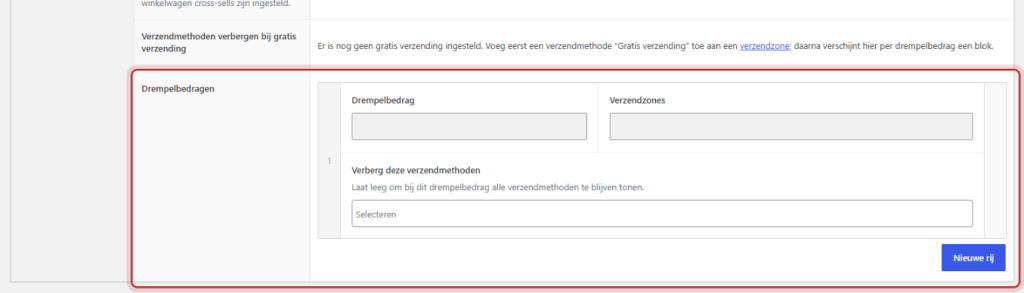
Note: The rules follow your shipping zones. If you change the threshold amount in WooCommerce, that threshold starts over here with the default (hide all paid methods). So check the setting after every change to your shipping costs. You cannot add or remove rows here: you do that in WooCommerce.
Testing
- Place products in your cart under the threshold amount in a private window. You will see the paid shipping methods.
- Add products until you exceed the amount.
- Go to the cart or checkout. Now only Free shipping (and possibly local pickup) should remain.
Good to know: Free shipping and local pickup are never hidden, no matter what you check. And if a setting would strike out all methods, leflite keeps them all visible so your customer can always check out.
Do you want to inform the customer in the cart that shipping costs are only calculated at checkout? Use Extra shipping information text, see adjusting the sidecart. Also handy: calm checkout with No Distraction and everything about your webshop.
Not working?
- There are no threshold amounts. There is no enabled shipping method Free shipping with a minimum amount. Set that up first in WooCommerce.
- The paid method remains. Check if it is selected for the correct threshold, and if the amount in the cart is really above the threshold (watch for discounts).
- Your change is not yet visible. Change something in your cart (for example, the quantity), then WooCommerce will recalculate the shipping.
- A threshold is no longer as you had it. You have adjusted the amount in WooCommerce. Set the methods to hide again.
Can’t figure it out? Contact us, call 06 35 66 47 73 or email info@lefcreative.nl.
Share this article
Robert Oosterloo
Robert Oosterloo is eigenaar en UX/UI-designer van Lef Creative in Kollum. Hij ontwerpt websites, webshops en software voor ondernemers in Noord-Nederland.
Read also
Display categories as buttons or cards
How do I set how products are displayed in the overview?
How do I customize the sidecart?






Want a website like this?
Here you can read how easy it is to maintain a leflite site yourself. Want one too? We will think along with you, no strings attached.
Prefer direct contact? Call Robert at 06 35 66 47 73 or send a WhatsApp.