
How do I display prices incl. or excl. VAT and set up VAT shifting?

Robert Oosterloo
Updated on · 4 min read
If you sell to businesses, they often want to see the price without VAT. And if you supply to a business in another EU country, VAT can be shifted. leflite can do both: show the price including and excluding VAT, and shift VAT for business customers with a valid VAT number.
In short
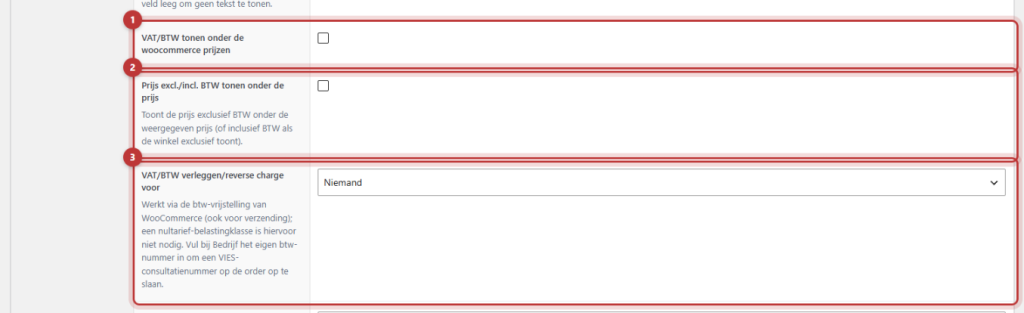
- Everything is located at General options → Webshop, tab Orders & VAT.
- Show VAT under WooCommerce prices adds the rate next to the price, such as “incl. 21% VAT”.
- Show price excl./incl. VAT under the price also shows the other price.
- Shift VAT/reverse charge for determines for whom VAT can be shifted.
Note: VAT rules are complex and vary by situation. We explain how the settings work here, not what is correct for your business. Always have your choice checked by your accountant.
Step 1: Open the Orders & VAT tab
Go to General options → Webshop and click on the Orders & VAT tab. After making a change, click Update. The VAT rates themselves and the choice of whether to enter prices including or excluding VAT are managed in WooCommerce (WooCommerce → Settings → Tax).
The VAT rate under the price
Enable Show VAT under WooCommerce prices. The rate will then appear small next to the price, for example “(incl. 21% VAT)”. Whether it says incl. or excl. depends on how your store displays prices. For a product without VAT, leflite shows the zero rate.
Nog geen website op leflite?
Wij bouwen hem samen met jou. Daarna pas je alles zelf aan, precies zoals in dit artikel.
- Online binnen een week
- Hosting, SSL en back-ups inbegrepen
- Vanaf €49,95 per maand

Show the other price
Enable Show price excl./incl. VAT under the price. If your store shows prices including VAT, the price excluding VAT will also be displayed below. If your store shows excluding, then the price including will be shown below. This way, business customers do not have to calculate themselves.
Shift VAT (reverse charge)
If your customer chooses to shift VAT at checkout and enters a valid VAT number, WooCommerce will deduct VAT from the products and shipping. In Shift VAT/reverse charge for you determine for whom this can apply:
- Nobody: VAT shifting is off.
- EU: customers with an invoice address in an EU country.
- ALL: customers in any country.
- Specific countries: only the countries you specify in Shift VAT/reverse charge only for these countries, as country codes separated by commas, such as
BE,DE.
Exclude countries
For EU and ALL, you can exclude countries with Exclude VAT shifting/reverse for, for example NL. Note: The Netherlands is also an EU country. If you choose EU and do not want Dutch businesses to shift VAT, enter NL here. Discuss with your accountant what applies to you.
Only for businesses
Enable Exclude VAT shifting/reverse only for businesses to offer VAT shifting only if the customer enters a business name.
What does your customer see at checkout?
At checkout, a checkbox VAT shifted (reverse charge) and a field VAT number appear. The number is immediately checked in VIES, the VAT register of the EU. The customer sees “Valid” (with the business name) or “Invalid VAT number”. Only with a valid number will VAT be deducted. If VIES is temporarily unavailable, the number counts as valid. The order will then state “VIES not available at order”, so you can check the number later.
Enter your own VAT number in General options → Business details. Then leflite will also store a VIES consultation number with each order, as proof that you have checked the number. See change business details.
Good to know: This tab also contains Do not synchronize business details to WooCommerce. By default, WooCommerce takes your business details and logo from the General options, for example for emails. Only enable this if you want to use different details in WooCommerce intentionally.
More about checkout: calm checkout with No Distraction. Also mandatory for consumer sales: the cancellation button. Everything at a glance: everything about your webshop.
Not working?
- The customer does not see a field for the VAT number. Is Shift VAT/reverse charge for set to Nobody? Choose EU, ALL, or Specific countries.
- VAT is not deducted. Is the checkbox enabled, is the invoice address country correct, and is the number valid in VIES? Also check if the country is not excluded and if the customer has entered a business name if you made that mandatory.
- Dutch customers get VAT shifted. Enter
NLin Exclude VAT shifting/reverse for. - There is no rate next to the price. Check if VAT is enabled in WooCommerce → Settings and if rates are set.
Can’t figure it out? Contact us, call 06 35 66 47 73 or email info@lefcreative.nl.
Share this article
Robert Oosterloo
Robert Oosterloo is eigenaar en UX/UI-designer van Lef Creative in Kollum. Hij ontwerpt websites, webshops en software voor ondernemers in Noord-Nederland.
Read also
Display categories as buttons or cards
How do I set how products are displayed in the overview?
How do I customize the sidecart?






Want a website like this?
Here you can read how easy it is to maintain a leflite site yourself. Want one too? We will think along with you, no strings attached.
Prefer direct contact? Call Robert at 06 35 66 47 73 or send a WhatsApp.