
How do I create expandable blocks with the accordion?

Robert Oosterloo
Updated on · 4 min read
An accordion is a row of titles that expand when clicked. This keeps a page with a lot of information organized: the visitor only opens what they want to read. With the block Accordion, you can create such a row in just a few minutes. You can also read when it’s better to use the block for frequently asked questions.
In short
- Add the block Accordion in a column.
- Click on Add new accordion for each item and fill in Title and Content.
- Drag items to change the order.
- On the website, all items are closed; a click on the title expands the text.
- For frequently asked questions that you show on multiple pages, the Frequently Asked Questions module is more convenient.
Step 1: Add the Accordion block
Click on the + (Add block) in a column, type ‘accordion’ and choose Accordion. The editing window opens with an empty list Accordions.
Step 2: Add items
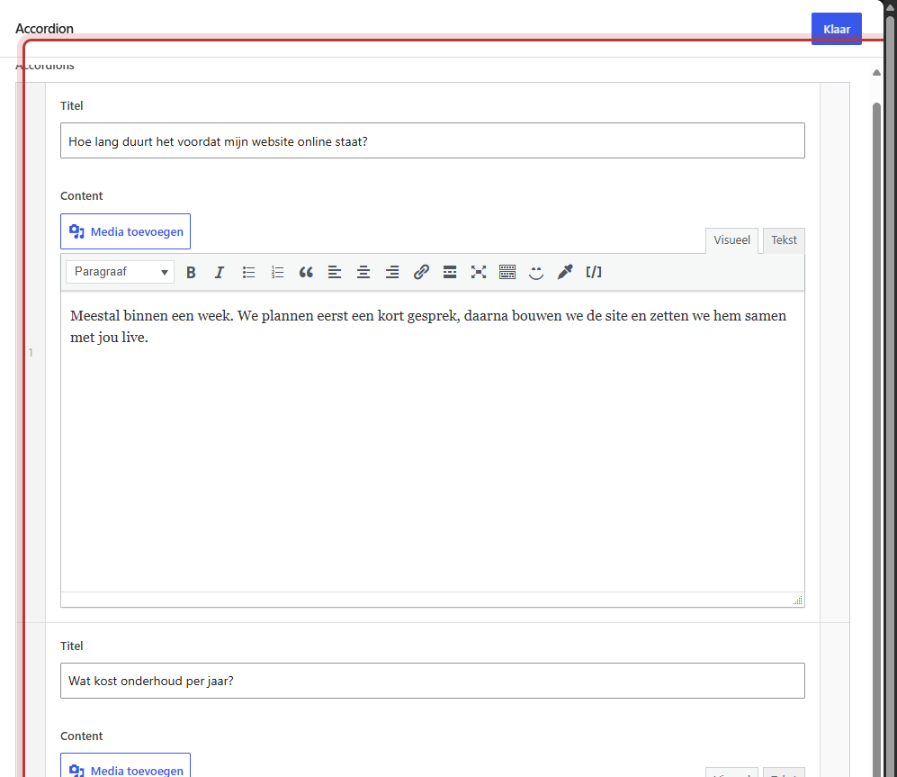
Click on Add new accordion. Each item has two fields:
- Title: the text that is always visible, for example, a question. Keep it short.
- Content: the text that expands. This field works like the Text block: you can use bullet points, bold words, and links.
Click again on Add new accordion for the next item. You can create as many items as you want.
Nog geen website op leflite?
Wij bouwen hem samen met jou. Daarna pas je alles zelf aan, precies zoals in dit artikel.
- Online binnen een week
- Hosting, SSL en back-ups inbegrepen
- Vanaf €49,95 per maand

Step 3: Adjust the order
Grab an item on the left (the number) and drag it to a different place. Use the minus sign on the right to remove an item. Collapse an item with the arrow at the top, so your list stays organized while you work.
Click on Done and then on Save.
How does it work on the website?
On the website, all items are listed one below the other, each in a box with a plus sign on the right. All items are initially closed. When a visitor clicks on a title, the text expands and the plus sign turns into a cross. Clicking again collapses it back. Multiple items can be open at the same time.

Tip: make sure to phrase the title exactly as the question or topic your visitor is looking for. They should be able to see from the title whether expanding it is worth their time.
Highlight Accordion or Frequently Asked Questions?
For frequently asked questions, leflite also has a module. With it, you add each question once and display it with the block Highlight Frequently Asked Questions on as many pages as you want. On the website, it looks the same as an accordion.
| Accordion | Frequently Asked Questions | |
|---|---|---|
| Fill in the text | In the block itself | Once, in the module |
| On multiple pages | Again per page | The same question everywhere |
| Suitable for | Information that belongs to one page | Questions that come up frequently |
Read add frequently asked questions and show frequently asked questions on a page.
Google and FAQ data
The text in an accordion is simply on your page, so Google can read it. The block Highlight Frequently Asked Questions provides your questions with additional information that search engines recognize as questions and answers. The accordion does not do that.
Other ways to hide content
Do you want to let visitors choose between entire sections, for example, by service? Then tabs are more convenient. See tabs that show different sections.
Having trouble?
- An item is empty on the website. The field Content is not filled in.
- You want the first item to be open. That is not possible; all items start closed.
- You want the same questions on multiple pages. Use the Frequently Asked Questions module. See enable modules.
- Can’t figure it out? Contact us.
You can find other blocks in all blocks in one place.
Frequently Asked Questions
Yes, the text is simply on the page, even when it is collapsed. For additional FAQ data, use the Frequently Asked Questions module.
Share this article
Robert Oosterloo
Robert Oosterloo is eigenaar en UX/UI-designer van Lef Creative in Kollum. Hij ontwerpt websites, webshops en software voor ondernemers in Noord-Nederland.
Read also
Automatically display posts or pages
Setting up a slider
Using the Text block






Want a website like this?
Here you can read how easy it is to maintain a leflite site yourself. Want one too? We will think along with you, no strings attached.
Prefer direct contact? Call Robert at 06 35 66 47 73 or send a WhatsApp.