
How do I make numbers count up with the counter?

Robert Oosterloo
Updated on · 3 min read
Numbers like ‘250+ satisfied customers’ or ‘15 years of experience’ stand out, especially when they are large and add up. With the block Counter, you can display a row of key figures on your page, each with a brief explanation underneath.
In short
- Add the block Counter in a column.
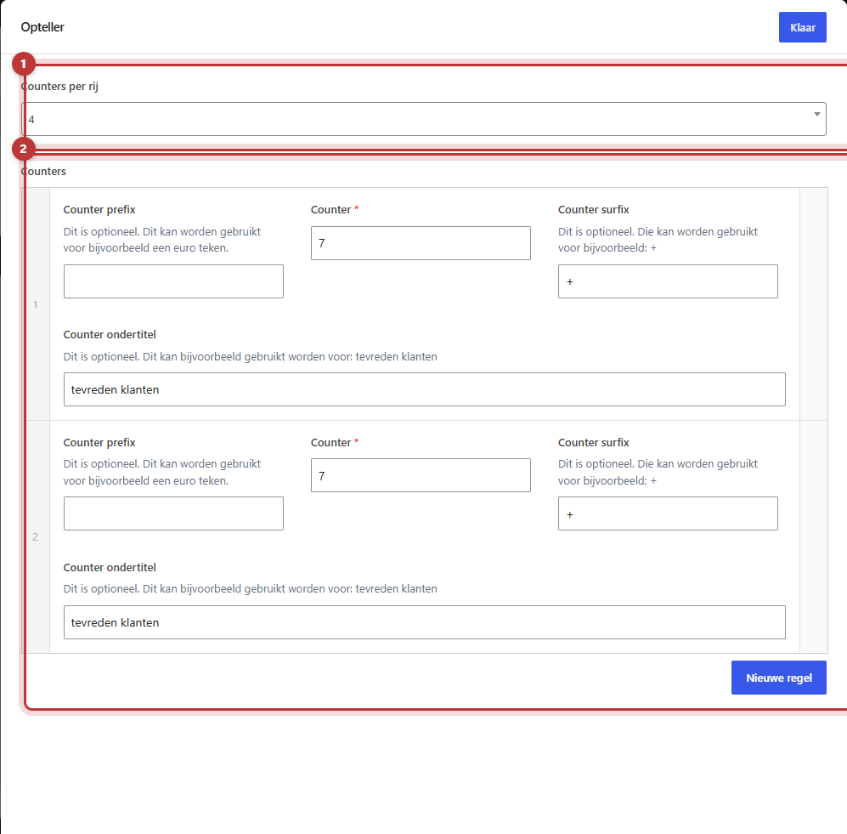
- Choose under Counters per row how many numbers are displayed side by side (1 to 4).
- Click on each number for New line and fill in Counter, optionally with a Counter prefix and Counter surfix.
- Set under Counter subtitle what the number means.
- The numbers count up from 0 to your number as soon as the page is loaded.
Nog geen website op leflite?
Wij bouwen hem samen met jou. Daarna pas je alles zelf aan, precies zoals in dit artikel.
- Online binnen een week
- Hosting, SSL en back-ups inbegrepen
- Vanaf €49,95 per maand

Step 1: Add the Counter block
Click on the + (Add block) in a column, type ‘counter’ and choose Counter. Place the block in a wide column, for example, a section with one column across the full width. This gives the numbers space.
Step 2: Choose Counters per row
Under Counters per row, choose 1, 2, 3, or 4. By default, four are displayed side by side. If you have three numbers, choose 3. On a phone, the numbers will stack vertically.
Step 3: Fill in the fields for each number
Click under Counters on New line. Each number has four fields:
- Counter prefix (optional): something before the number, like a euro sign.
- Counter: the number itself. Enter a whole number, without dots, for example, 1250.
- Counter surfix (optional): something after the number, like a plus sign or ‘%’. This will appear on the website in your main color.
- Counter subtitle (optional): what the number means, for example, ‘satisfied customers’.
Repeat this for each number. Click on Done and then on Save.

How does it count?
Once the page is loaded, all numbers count up from 0 to the number you entered in about three seconds. The prefix and surfix appear immediately. If the counter is at the bottom of a long page, it may already be done counting by the time your visitor arrives. That’s okay: the number is still accurate.
Tips: which numbers work?
- Real and verifiable. Only use numbers that are accurate. A visitor who sees an exaggerated number will not trust the rest either.
- Meaningful. ‘15 years of experience’ or ‘98% recommend us’ says more than ‘3,400 cups of coffee’.
- Concise. Keep the subtitle to two or three words.
- Keep track. Set a reminder to check the numbers once a year.
- Three or four. More numbers side by side become cluttered.
Tip: do you want a number that grows automatically, like the number of years since your founding? You can do this in text with the shortcode for the date difference. See the date automatically in text.
Not working?
- You see no number. The field Counter is empty or 0. Enter a number of 1 or higher.
- The number is incorrect. Type the number without dots or spaces: 1250, not 1.250.
- The numbers are not neatly aligned. Set Counters per row equal to the number of figures.
- You do not see the counting. The counting starts when the page loads. If you scroll to the counter later, it may already be finished. Refresh the page while the counter is in view to see it.
- Can’t figure it out? Contact us.
Do you want to count down to a date instead of counting up? See a countdown to a date. You can find all blocks in all blocks in a row.
Share this article
Robert Oosterloo
Robert Oosterloo is eigenaar en UX/UI-designer van Lef Creative in Kollum. Hij ontwerpt websites, webshops en software voor ondernemers in Noord-Nederland.
Read also
Automatically display posts or pages
Setting up a slider
Using the Text block






Want a website like this?
Here you can read how easy it is to maintain a leflite site yourself. Want one too? We will think along with you, no strings attached.
Prefer direct contact? Call Robert at 06 35 66 47 73 or send a WhatsApp.