
How do I create a row of logos from customers or partners?

Robert Oosterloo
Updated on · 3 min read
A row of logos from customers, partners, or quality marks shows who you work with. On your website, you create this with the Gallery (static) or with the Image slider (moving). The most important work is in the preparation: logos that look equally sized.
In short
- Place all logos on the same canvas, for example, 400 x 200 pixels, with a transparent background.
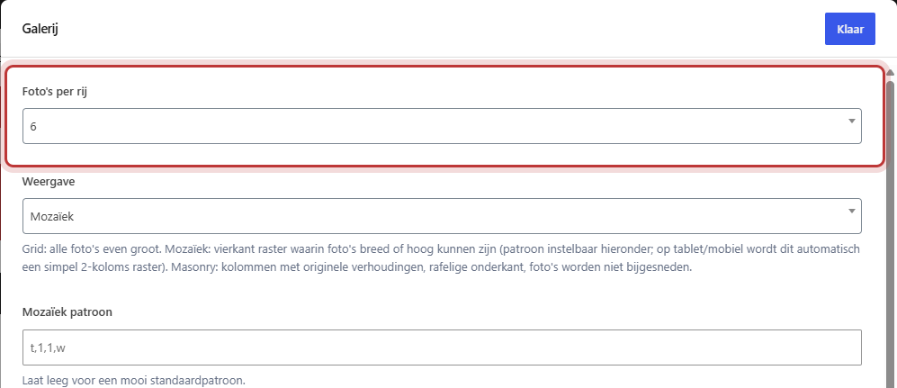
- Static: a Gallery with Photos per row set to 6.
- Moving: an Image slider with 5 or 6 Items in slider and Automatic sliding.
- Want to link? Fill in the Link field for each logo in the media library.
Step 1: Prepare the logos
Logos all have different shapes: some are wide, others are almost square. If you place them loosely in a row, they look messy. Therefore:
- Place each logo on the same canvas, for example, 400 x 200 pixels. Use a free tool like Canva or Photopea for this.
- Leave some empty space around and make wide logos slightly smaller than square ones, so they appear equally weighted.
- Use a transparent background (PNG or SVG), so the logo fits any section color.
- Give the file a clear name, such as
logo-bakkerij-dijkstra.png, and fill in the Alternative text with the name of the company. See how to fill in good alt text.
Only use logos from customers or partners who are okay with you displaying their logo.

Option 1: static, with the Gallery
- Add the Gallery block in a wide column.
- Select your logos in the Gallery and arrange them in the correct order.
- Set Photos per row to 6. If you have more logos, they will appear on a second row.
- Keep Display set to Grid (default).
- Click on Save.
On tablet and phone, fewer logos will automatically appear next to each other. All options for the gallery can be found in creating a photo gallery.
Nog geen website op leflite?
Wij bouwen hem samen met jou. Daarna pas je alles zelf aan, precies zoals in dit artikel.
- Online binnen een week
- Hosting, SSL en back-ups inbegrepen
- Vanaf €49,95 per maand

Option 2: moving, with the Image slider
- Add the Image slider block in a wide column.
- Add a row for each logo in Slides and select the logo in Image.
- Set the Slider settings to Items in slider to 5 or 6.
- Enable Automatic sliding and Infinite slider. For Automatic sliding after X seconds, 3 or 4 is a calm pace.
- On the Mobile devices tab, set the Items in mobile slider to 2 or 3.
Read more about the settings in setting up a slider.
Good to know: the slider crops images to fit. With logos on the same canvas, nothing gets cut off.
Linking logos
Do you want a click on a logo to go to that customer’s or partner’s website? Open the logo in Media → Library and fill in the Link field, with Open link in new tab enabled. In the gallery, a click will then go to that website instead of the enlarged view. Read how to make a photo clickable in the gallery.
Not working?
- The logos are not the same size. Place them on the same canvas and upload them again.
- There is a white border around a logo. The logo does not have a transparent background. Use a PNG or SVG version without a background.
- A logo opens large instead of linking. Fill in the Link field for that logo in the media library.
- The slider is static. Enable Automatic sliding, and on the Mobile devices tab also enable Automatic sliding on mobile.
- Logos are being cut off in the slider. Use the same canvas for all logos with some empty space around them.
Can’t figure it out? Contact us.
Share this article
Robert Oosterloo
Robert Oosterloo is eigenaar en UX/UI-designer van Lef Creative in Kollum. Hij ontwerpt websites, webshops en software voor ondernemers in Noord-Nederland.
Read also
Setting up a slider
A video as a background
A photo as the background of a section






Want a website like this?
Here you can read how easy it is to maintain a leflite site yourself. Want one too? We will think along with you, no strings attached.
Prefer direct contact? Call Robert at 06 35 66 47 73 or send a WhatsApp.