
How do I display frequently asked questions on a page?

Robert Oosterloo
Updated on · 4 min read
You have added frequently asked questions and want to place them on a page. You do this with the block Highlight Frequently Asked Questions. The questions appear as expandable blocks: the visitor clicks on a question and sees the answer.
In short
- Add the block Highlight Frequently Asked Questions in a column.
- Choose under Type of highlighting: individual questions, selected categories, or all categories.
- You can place categories side by side with Width.
- The block sends the questions to Google as FAQ (schema).
- Don’t see the block? First, enable the module.
Step 1: Add the Highlight Frequently Asked Questions block
Open the page and click in the column where the questions should go on the +. Search for “questions” or “faq” and choose Highlight Frequently Asked Questions. The block only appears in the list if the Frequently Asked Questions module is enabled (see enabling modules).
Step 2: Choose the Type of highlighting
On the right in the block settings, choose under Type of highlighting how you select questions.
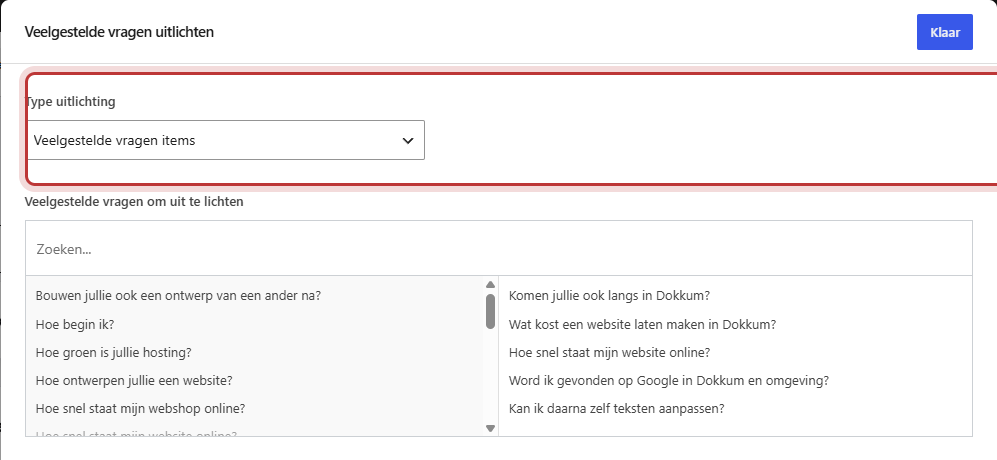
Frequently Asked Questions items (individual questions)
You choose which questions to display in the field Frequently Asked Questions to highlight. Handy on a service page where only three or four questions fit. On the website, they are listed by publication date, with the newest on top.
Frequently Asked Questions categories
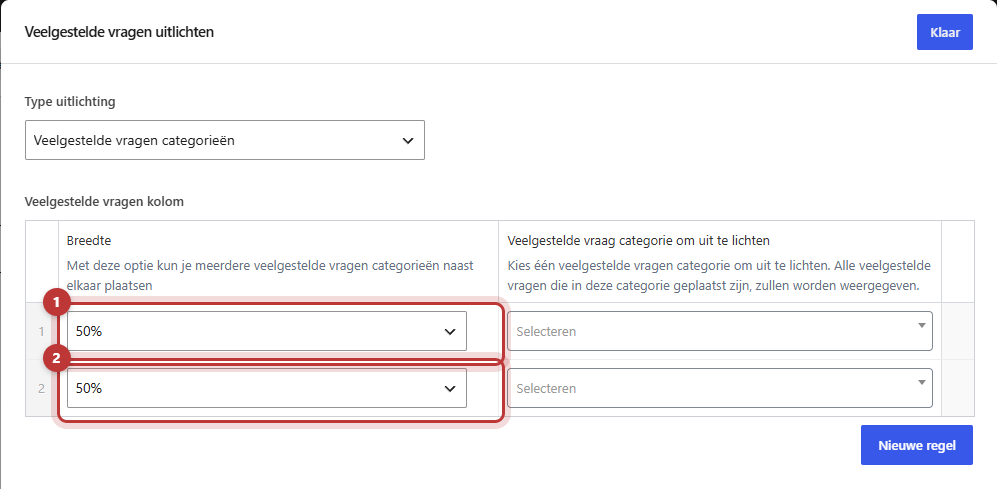
You choose one or more categories in Frequently Asked Questions column. For each line, you choose under Frequently Asked Question category to highlight a category. All questions in that category will appear, with the category name as a header above. If you later add a question to the category, it will automatically be included.
All frequently asked questions categories (automatically)
All categories listed one below the other, each with their questions. Ideal for a separate “Frequently Asked Questions” page. A new category will also automatically be added when you create one. The oldest category is at the top.
Nog geen website op leflite?
Wij bouwen hem samen met jou. Daarna pas je alles zelf aan, precies zoals in dit artikel.
- Online binnen een week
- Hosting, SSL en back-ups inbegrepen
- Vanaf €49,95 per maand

Step 3: Place categories side by side with Width
If you choose Frequently Asked Questions categories, then each line also has a Width: 100%, 66%, 50%, or 33%. Two categories at 50% are next to each other, three at 33% as well. On a phone, they are always stacked.

FAQ schema: what does Google do with it?
The block presents the questions and answers in a format that Google understands: FAQ schema. This way, Google knows exactly what the question is and what the answer is. This helps Google understand your page. Google decides for itself whether and how it displays the questions in the search results; so don’t count on them appearing as expandable questions under your result.
Do not place the same question on many pages at once. Choose the questions that truly belong to that page for each page. You can read more about discoverability in everything about SEO.
Accordion or this block?
The block Accordion looks the same, but you type the questions directly into the block itself. Use the Accordion block for expandable texts that only appear on one page (see expandable blocks with the accordion). Use Highlight frequently asked questions if you want the same questions in multiple places and want to keep them in one location.
Not working?
- The block is not in the list. Enable the Frequently Asked Questions module under General options.
- You see “There are currently no frequently asked questions available.” The selected category has no published questions yet. Add questions or choose a different category. See adding frequently asked questions.
- Nothing is displayed. For individual questions, you must choose at least one question; for categories, at least one line with a category.
- The categories are listed one below the other while you want them side by side. Set the Width to 50% or 33%. On a phone, they are always stacked.
Can’t figure it out? Contact us or call 06 35 66 47 73. We would be happy to help.
Frequently Asked Questions
The block only appears when the Frequently Asked Questions module is enabled, under General options → Frequently Asked Questions.
Share this article
Robert Oosterloo
Robert Oosterloo is eigenaar en UX/UI-designer van Lef Creative in Kollum. Hij ontwerpt websites, webshops en software voor ondernemers in Noord-Nederland.
Read also
Automatically display posts or pages
Placing a quote
Display categories as buttons or cards






Want a website like this?
Here you can read how easy it is to maintain a leflite site yourself. Want one too? We will think along with you, no strings attached.
Prefer direct contact? Call Robert at 06 35 66 47 73 or send a WhatsApp.