
How do I align columns or make them equal height?

Robert Oosterloo
Updated on · 3 min read
Are your columns misaligned with each other, or are your cards of uneven height with buttons at different levels? You can fix this with one setting in the section: the alignment of the columns.
In short
- Select the section and open Alignment settings.
- Choose under Column alignment: Top, Middle, Bottom or Stretch.
- With Stretch, cards will be the same height and the buttons will be aligned.
- The default is Middle.
Nog geen website op leflite?
Wij bouwen hem samen met jou. Daarna pas je alles zelf aan, precies zoals in dit artikel.
- Online binnen een week
- Hosting, SSL en back-ups inbegrepen
- Vanaf €49,95 per maand

Step 1: Select the section
The alignment is a setting of the section, not of the column. Click on the edge of the section, or choose Section in the list view.
Step 2: Open Alignment settings
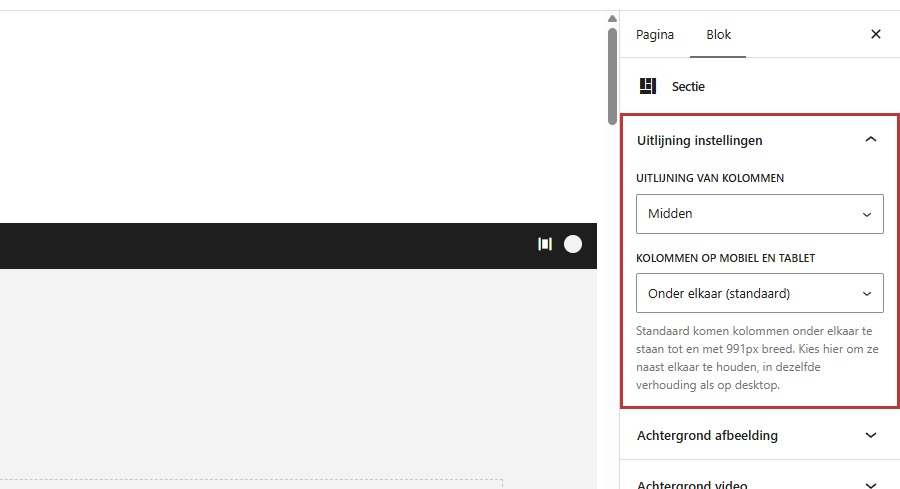
On the right in the sidebar, at the top of the panel is Alignment settings.
Step 3: Choose Top, Middle, Bottom, or Stretch
In the dropdown, choose Column alignment:
- Top: all columns start at the top. Good for text next to text, so that the headings are aligned.
- Middle: columns are vertically centered with respect to each other. Good for a short text next to a large photo. This is the default.
- Bottom: columns align at the bottom.
- Stretch: all columns will be the same height as the tallest.
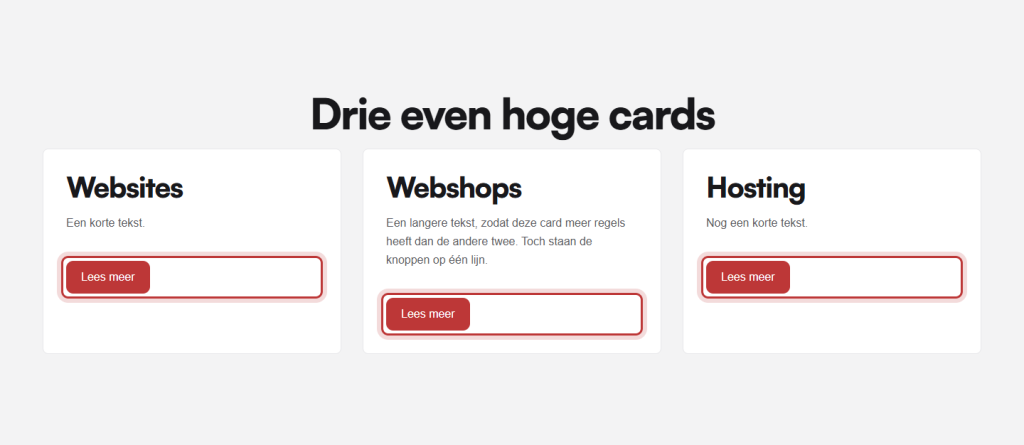
Stretch: equal height cards with buttons at the bottom
If you have three columns as cards (or three Card blocks) with texts of different lengths, the cards will be of uneven height. Choose Stretch: all cards will be the same height as the tallest, and the buttons will move to the bottom. This way, they are neatly aligned.
How to turn a column into a card, read in showing a column as a card. For a card with an image, text, and button in one block, see the Card block.
Text at the bottom of a tall section
If the section has a minimum height, for example, a hero of 85 vh with a photo behind it? Then the same alignment also determines where your content is positioned in the section. Choose Bottom for a large title at the bottom of the photo, or Top for text at the top. You set the height in the height and spacing of a section.
Photo and text equal height
If you place your text next to a photo in the block Image and choose Stretch, then the columns will be equal height, but the photo itself will not stretch automatically: it will maintain its own ratio. If you want the photo to fill the entire height, ask us to arrange this in the house style. Or choose a photo with approximately the same ratio as your text block.
Tip: in a section with a title spanning the full width (column of 12) and three cards underneath, the alignment applies to all columns. Stretch will also work on the title column, but you won’t see it. So you can simply choose Stretch.
Not working?
- You don’t see Alignment settings: you have selected a column or block. Select the section.
- Cards are not equal height: check if the alignment is set to Stretch. Cards in different sections will not be equal height with each other.
- Columns in a row are different: a Row within a column has its own alignment. Select the row and set Column alignment there.
- On mobile, everything is stacked: that is normal. Alignment only works when columns are next to each other; see columns on mobile.
More about columns in adding a section and organizing in columns.
Share this article
Robert Oosterloo
Robert Oosterloo is eigenaar en UX/UI-designer van Lef Creative in Kollum. Hij ontwerpt websites, webshops en software voor ondernemers in Noord-Nederland.
Read also
More space between blocks
Tabs with Section tabs
Automatically display subpages as tiles






Want a website like this?
Here you can read how easy it is to maintain a leflite site yourself. Want one too? We will think along with you, no strings attached.
Prefer direct contact? Call Robert at 06 35 66 47 73 or send a WhatsApp.