
How do I remove a page from Google (noindex)?

Robert Oosterloo
Updated on · 3 min read
Not every page belongs in Google. A thank you page after a form, a test page, or a page that is almost identical to another: you don’t want those in the search results. With Yoast SEO, you can set such a page to noindex. And if it’s already there, you can remove it faster with Google Search Console.
In short
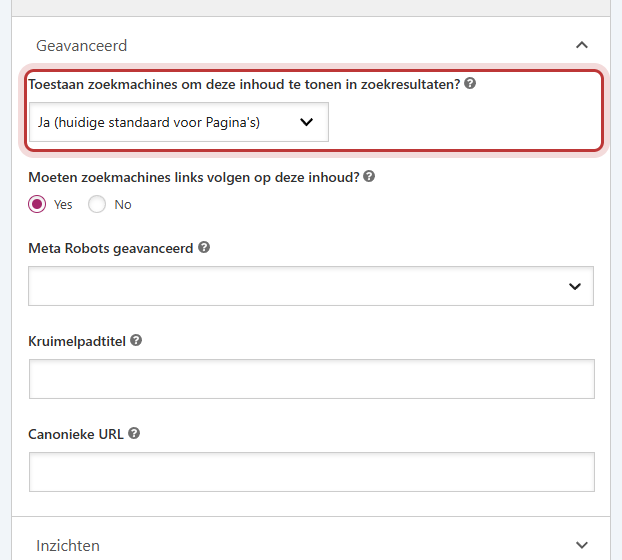
- Open the page and expand the Yoast SEO block Advanced.
- Select Allow search engines to show this content in search results? and choose No.
- If the page is already in Google, it will disappear after the next visit from Google.
- Need it faster? Use Removals in Google Search Console.
Which pages should not be in Google?
- Thank you pages after a form or order. Someone landing there via Google has not filled anything out.
- Test and draft pages that have been published anyway.
- Almost duplicate pages, such as a print version or a copy for a campaign.
- Pages with little value for a searcher, such as an internal price list that you only share via a link.
Your homepage, service pages, and blog posts should never be set to noindex. And your own 404 page is already automatically excluded.
Step 1: Open Advanced in Yoast
- Open the page in the editor.
- Scroll down to the Yoast SEO block below the page.
- Expand the Advanced section.
Nog geen website op leflite?
Wij bouwen hem samen met jou. Daarna pas je alles zelf aan, precies zoals in dit artikel.
- Online binnen een week
- Hosting, SSL en back-ups inbegrepen
- Vanaf €49,95 per maand

Step 2: Turn off search engines for this page
- In Allow search engines to show this content in search results? the default setting of your site is shown, for example, “Yes (current default for Pages)”.
- Choose No.
- Click Save.
Yoast will now add a noindex code to the page and remove it from your sitemap. The page will still be accessible to anyone with the link.
Tip: Also remove a thank you page from your menu. Read how to use such a page in adjusting the thank you message after submission.
Is the page already there? Use Search Console
A noindex only works when Google visits the page again. This can take days to weeks. Need it faster, for example, because there is something on it that really shouldn’t be there?
- Open Google Search Console for your website. Not linked yet? Read linking your website to Search Console.
- Go to Removals and make a new request.
- Paste the URL of the page and submit the request.
Such a removal is temporary, about half a year. Therefore, also set the page to noindex (step 2), otherwise it will come back later.
Noindex or remove?
- Noindex: the page should remain accessible for those who have the link, but not in Google. Like a thank you page.
- Remove: the page is no longer useful. Redirect the old URL to the best replacement; read setting up a redirect.
Good to know: Do you want to keep your entire website out of Google, for example, because it is not ready yet? Then you don’t set every page to noindex, but use a coming-soon page. See enabling a coming-soon page. More about Yoast: setting up Yoast SEO. Everything in one place: everything about SEO.
Not working?
- The page is still in Google after weeks. Check if the choice is really set to No and if you have saved it. Request in Search Console under URL inspection for the page to be re-evaluated.
- You do not see the Advanced section. Expand the Yoast SEO block below the page. Advanced is at the bottom, under the analysis.
- A page is accidentally out of Google. Set the choice back to the default (Yes) and save. Request in Search Console for the page to be re-indexed.
Can’t figure it out? Contact us, call 06 35 66 47 73 or email info@lefcreative.nl.
Share this article
Robert Oosterloo
Robert Oosterloo is eigenaar en UX/UI-designer van Lef Creative in Kollum. Hij ontwerpt websites, webshops en software voor ondernemers in Noord-Nederland.
Read also
Using the Text block
Display a breadcrumb trail
Share buttons for social media






Want a website like this?
Here you can read how easy it is to maintain a leflite site yourself. Want one too? We will think along with you, no strings attached.
Prefer direct contact? Call Robert at 06 35 66 47 73 or send a WhatsApp.