
How do I display a breadcrumb trail (breadcrumbs)?

Robert Oosterloo
Updated on · 4 min read
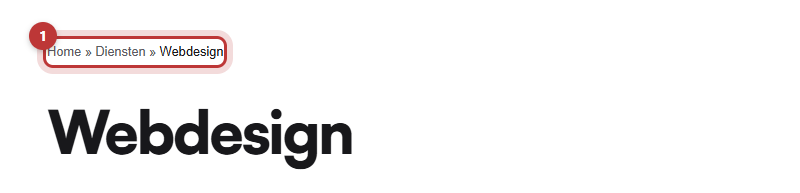
A breadcrumb trail, also known as breadcrumbs, shows where a visitor is on your website: Home » Services » Web Design. With one click, they can go back one level. With the block Breadcrumbs, you can place such a trail at the top of your page. The block fills itself.
In short
- Add the block Breadcrumbs at the top of the page.
- The block has no settings; the trail is created automatically.
- The trail follows the structure of your main and subpages.
- The text and the separator come from Yoast SEO.
- A breadcrumb trail helps both visitors and search engines understand your site.
What is a breadcrumb trail?
A breadcrumb trail is a line with links from the homepage to the page you are on. Each step is a level in your site. If the page Web Design is under the page Services, then the trail is: Home » Services » Web Design. The last step is the current page and is not a link.
The trail follows the structure of your pages. How to place a page under another page is explained in creating a subpage under a main page.
Step 1: Add the Breadcrumbs block
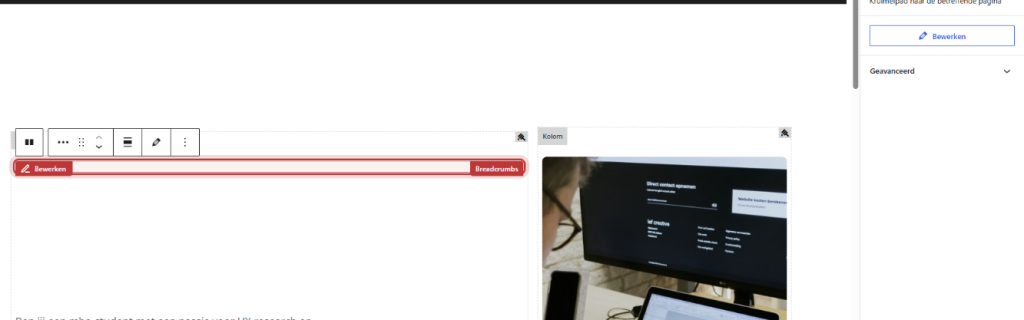
- Click in the top section of your page in the column on the + (Add block).
- Type ‘breadcrumbs’ and choose Breadcrumbs.
- Place the block above the page title. If it is below, move it up with the arrow.
- Click on Save.
In the edit window, there is only an explanation, no fields. You do not need to fill anything in.
Nog geen website op leflite?
Wij bouwen hem samen met jou. Daarna pas je alles zelf aan, precies zoals in dit artikel.
- Online binnen een week
- Hosting, SSL en back-ups inbegrepen
- Vanaf €49,95 per maand

Where does the text come from?
The block uses the breadcrumb trail from Yoast SEO. Yoast determines the steps, the text for the homepage, and the separator between the steps. For each step, the title of the page is in the trail.
Is the title of a page too long for the trail? In the Yoast block under your page, on the tab Advanced, there is the field Breadcrumb Title. Enter a shorter name there; Yoast will then use it only in the breadcrumb trail.
Setting up Breadcrumbs in Yoast
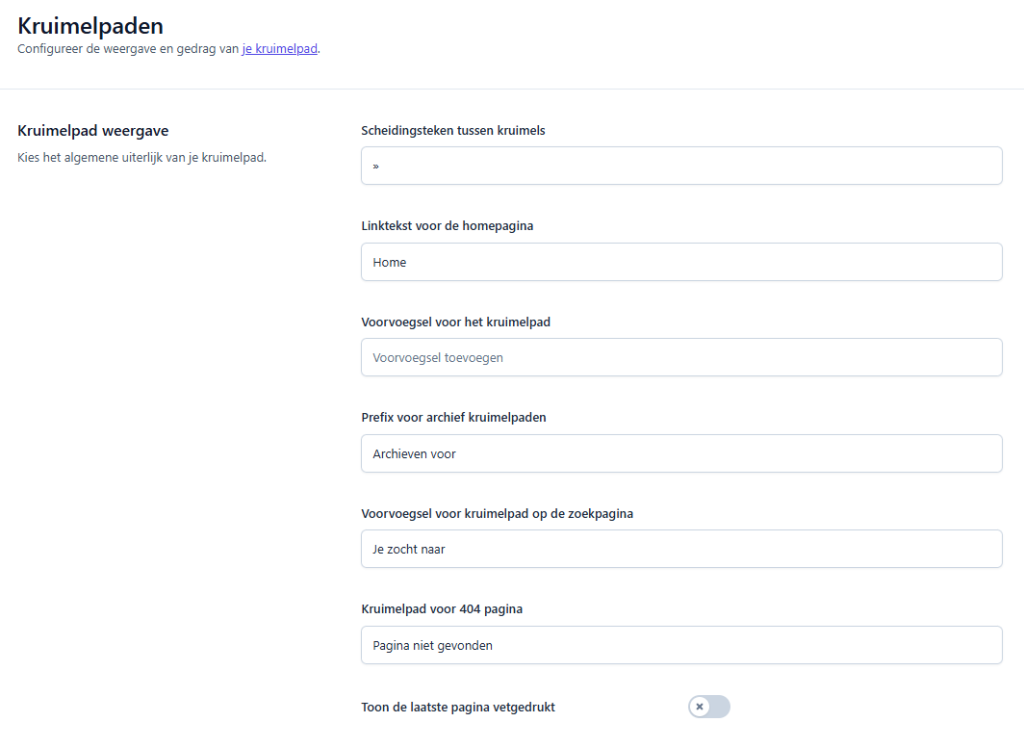
You can find the general settings at Yoast SEO → Settings → Advanced → Breadcrumbs. There you can adjust among other things:
- Separator between crumbs: the symbol between the steps, default is ».
- Link text for the homepage: default ‘Home’. You can make it your company name, for example.
- Show blog page in breadcrumb trail: whether your posts page is in the trail of a blog post.
Are you unsure about a setting? Leave it as is; the default works well. You can read more about Yoast in setting up Yoast SEO.
Why is it good for SEO?
- Visitors find their way. If someone arrives directly on a subpage via Google, they immediately see where they are and can click back to the overview with one click.
- Search engines understand your structure. Yoast also provides the breadcrumb trail to search engines. Google sometimes displays the trail in search results instead of the web address.
- More internal links. Each step is a link to a higher page. This also helps those pages.
You can read more about visibility in everything about SEO in your leflite website.
Tip: place the block in the same position on all pages of the same type, for example, above each service page. Create a pattern, and you only need to set it up once.
Not working?
- The trail is only ‘Home » Page’. The page has no main page. Choose a main page in the page settings. See creating a subpage.
- There is a long title in the trail. Enter a shorter Breadcrumb Title in Yoast.
- You want a different symbol than ». Adjust the Separator between crumbs in Yoast.
- Can’t figure it out? Contact us.
You can find all blocks in all blocks in one list.
Share this article
Robert Oosterloo
Robert Oosterloo is eigenaar en UX/UI-designer van Lef Creative in Kollum. Hij ontwerpt websites, webshops en software voor ondernemers in Noord-Nederland.
Read also
Automatically display posts or pages
Setting up a slider
Using the Text block






Want a website like this?
Here you can read how easy it is to maintain a leflite site yourself. Want one too? We will think along with you, no strings attached.
Prefer direct contact? Call Robert at 06 35 66 47 73 or send a WhatsApp.