
Everything about pages, sections, and columns

Robert Oosterloo
Updated on · 4 min read
Every page of your leflite website is made up of sections and columns. A section is a band across the width of the screen, and a column is a box within that band. In this overview, you can see what you can do with each of the two, with a link to the full explanation for each component.
In short
- A section determines the background (color, photo, or video), the height, the spacing, and the width.
- A column determines the width (1 to 12) and can become a card.
- You will see the options on the right in the sidebar when you select a section or column.
- On mobile, columns are stacked by default; you can adjust this per section.
Creating, moving, and deleting a page
You create a new page under Pages → New page; see adding a new page. You can also use an existing page as a base: copy a page. Pages are organized under a main page (creating a subpage). You can adjust the address of a page as described in changing the URL of your page.
The section: the band across the width
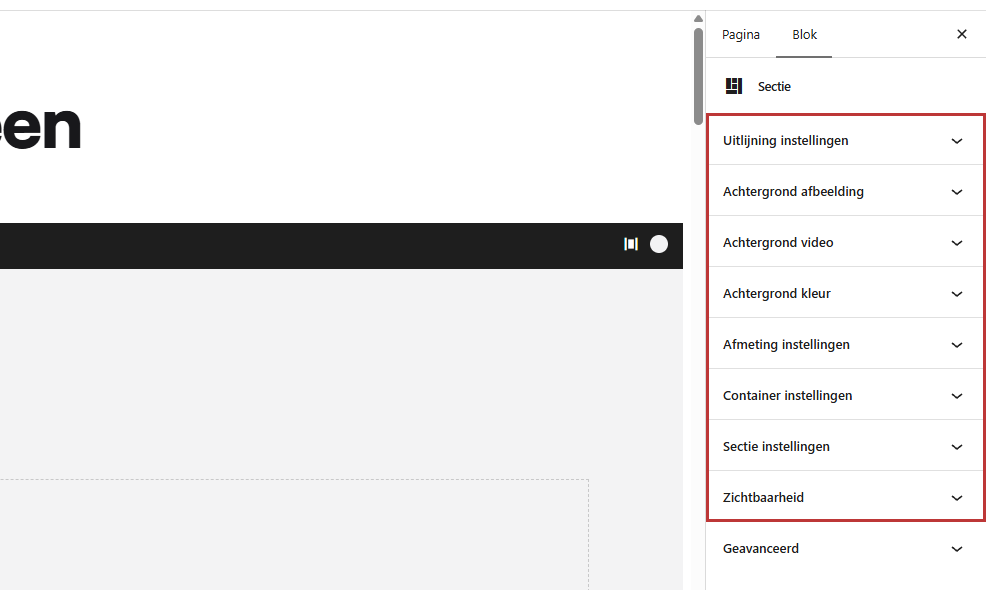
Click on the edge of a section in the editor, or select it from the list view. These panels will appear on the right:
- Alignment settings: how the columns are positioned relative to each other, and what happens to them on mobile.
- Background image and Background video.
- Background color.
- Size settings: minimum height and the space above and below.
- Container settings: the content across the full width.
- Section settings: a unique ID for an anchor link.
- Visibility: show the section only on desktop or only on mobile.
Background color, photo, and video
A section gets a color from your brand style (choosing a background color). You can also place a photo behind it, with an overlay or gradient to keep the text readable (using a photo as background), or a video (using a video as background). The text color always follows the color of the section.
Height, spacing, and width
A hero that fills the entire screen, less white space between two sections, or content across the full width: you can manage this in adjusting the height, spacing, and width of a section.
Anchor ID
Give a section a unique ID, so a button or menu item can jump directly to it. See creating an anchor link to a section.
Nog geen website op leflite?
Wij bouwen hem samen met jou. Daarna pas je alles zelf aan, precies zoals in dit artikel.
- Online binnen een week
- Hosting, SSL en back-ups inbegrepen
- Vanaf €49,95 per maand

The column: the box in the section
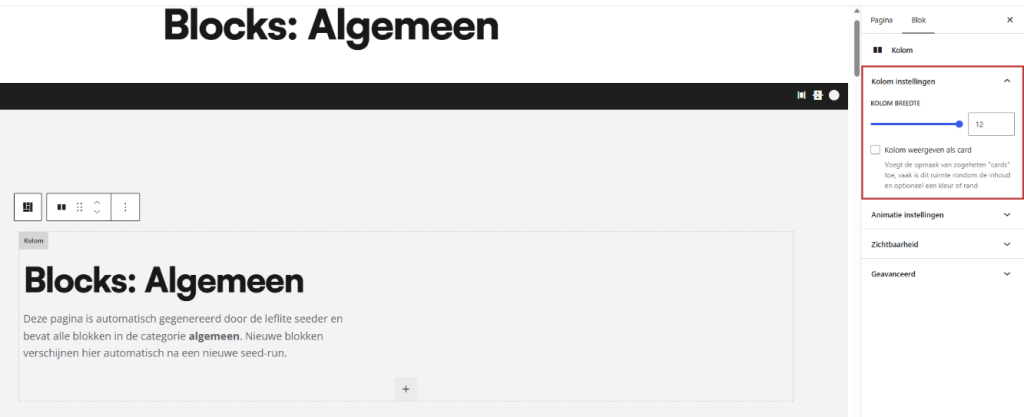
Click on a column to see its settings: Column settings, Visibility, and, if animations are enabled for your site, Animation settings.
Width and alignment
A section is 12 parts wide. Two columns of 6 sit next to each other, just like three of 4. How to set this up is explained in adding a section and organizing it into columns. If your columns are misaligned, or if you want cards of equal height? See aligning columns and making them equal height.
Column as card and overlapping
With Display column as card, a column gets a frame with a background color. Such a card can also overlap the previous or next section. See showing a column as a card. Should the entire tile be clickable? Read making a column or card fully clickable.
On mobile
Up to 991 pixels wide, so on phones and most tablets, columns will stack. You can keep them side by side per section, and with Visibility, you can show a section or column only on desktop or only on mobile. Everything about this is in what happens to your sections and columns on mobile.
All articles about pages & sections
- How do I add a section and divide it into columns?
- How do I give a section a background color?
- How do I set a photo as the background of a section (with overlay or gradient)?
- How do I set a video as background?
- How do I adjust the height, spacing, and width of a section?
- How do I align columns or make them equal height?
- How do I manage what happens on mobile with my sections and columns?
- How do I make a column a card (and let it overlap)?
- How do I link to a place further down the page (anchor)?
- How do I make a column or card fully clickable?
- How do I copy a page or post?
- How do I create a subpage under a main page?
Share this article
Robert Oosterloo
Robert Oosterloo is eigenaar en UX/UI-designer van Lef Creative in Kollum. Hij ontwerpt websites, webshops en software voor ondernemers in Noord-Nederland.
Read also
More space between blocks
Tabs with Section tabs
Automatically display subpages as tiles






Want a website like this?
Here you can read how easy it is to maintain a leflite site yourself. Want one too? We will think along with you, no strings attached.
Prefer direct contact? Call Robert at 06 35 66 47 73 or send a WhatsApp.